This post was translated from the original with AI assistance. Read the original
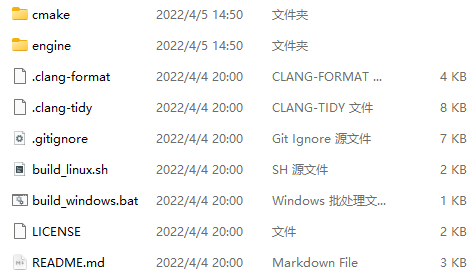
Next up, let’s go through the file and directory structure of the Pilot engine, and along the way briefly cover the third-party libraries Pilot uses and what they’re for.
Pilot’s File and Directory Structure#
Before diving into the source code, we first need to look at the project’s directory structure, as well as the third-party libraries involved and what they do.
The Pilot source, before any build step, contains two folders and a handful of files.
Folders:
- cmake - some CMake function-related stuff
- engine - engine-related stuff
Files:
- .clang-format - code formatting style
- .clang-tidy - static checks and fixes
- .gitignore - git ignore settings
- build_linux.sh - builds on Linux
- build_windows.bat - builds on Windows
- LICENSE - license
- README.md - readme
Let’s go through them one by one.
The cmake Folder#
The cmake folder mainly contains things related to CMake build functions:
- GenerateShaderCPPFile.cmake - generates the CPP files corresponding to shaders
- ShaderCompile.cmake - iterates over and compiles every shader
- tools.cmake - contains some utility functions
The engine Folder#
The engine folder mainly contains third-party libraries, assets, binaries, shaders, source code, and some config files.
3rdparty - third-party libraries, including:
- glfw - an open-source, cross-platform OpenGL application framework, typically used for window management; it also handles gamepad, keyboard, and mouse input, similar to SDL.
- glm - an open-source OpenGL math library.
- imgui - Dear ImGui, a hugely popular open-source immediate-mode GUI framework.
- json11 - Dropbox’s open-source JSON library.
- spdlog - an open-source, lightweight logging library.
- stb - open-source libraries for image and font processing.
- tinyobjloader - an open-source, lightweight OBJ file loader.
- vulkanmemoryallocator - an open-source Vulkan memory allocator.
- VulkanSDK - the Vulkan development kit, including headers, prebuilt static libraries, and so on.
asset - assets used at runtime, including levels (scenes), objects, textures, and worlds.
- level - levels, similar to Scenes in Unity.
- object - objects, including their textures, models, components, and so on.
- texture - textures; currently the default textures and skybox textures.
- world - worlds; a world is a container for levels.
bin - binaries. Contains the libraries and programs needed for each platform; for example, it currently includes the Clang libraries and meta_parser.
shader - shader code
source - source code, including editor code, precompile stuff, and runtime code:
- editor - editor code
- precompile - CMake scripts + JSON parameter configs, used to precompile some things
- runtime - runtime code
.gitignore - git ignore settings
CMakeLists.txt - CMake project configuration
PilotEditor.ini - Pilot editor configuration
That’s a quick rundown of Pilot’s file and directory structure. Next time I’ll briefly look at how Pilot uses CMake to wire the source code together, and also do a dedicated post on updating some of the third-party libraries.
Comments