This post was translated from the original with AI assistance. Read the original
What is the A* algorithm? How does it work? And where is it actually used?
The A* Algorithm and a 2D Demo Implementation in Unity#
The A* (pronounced “A-Star”) algorithm is a heuristic search algorithm commonly used in pathfinding systems for games. You can think of it as a combination of a greedy algorithm and breadth-first search (BFS). Every decision it makes is based on a cost estimate.
A* computes an overall evaluation value for each node using the following function:
- is the overall evaluation value of node n.
- is the cost (number of steps) from the start to node n (this may get updated).
- is the estimated cost from node n to the goal, also known as the heuristic function.
The A* Algorithm#
A* usually works on a grid (or on pixels): it simplifies the search area into lots of small squares, and the resulting path is a sequence of these squares. Of course, other shapes work too, and it can be further refined and upgraded for special terrain (NavMesh pathfinding).
Here I’ll use a grid of squares as the example.
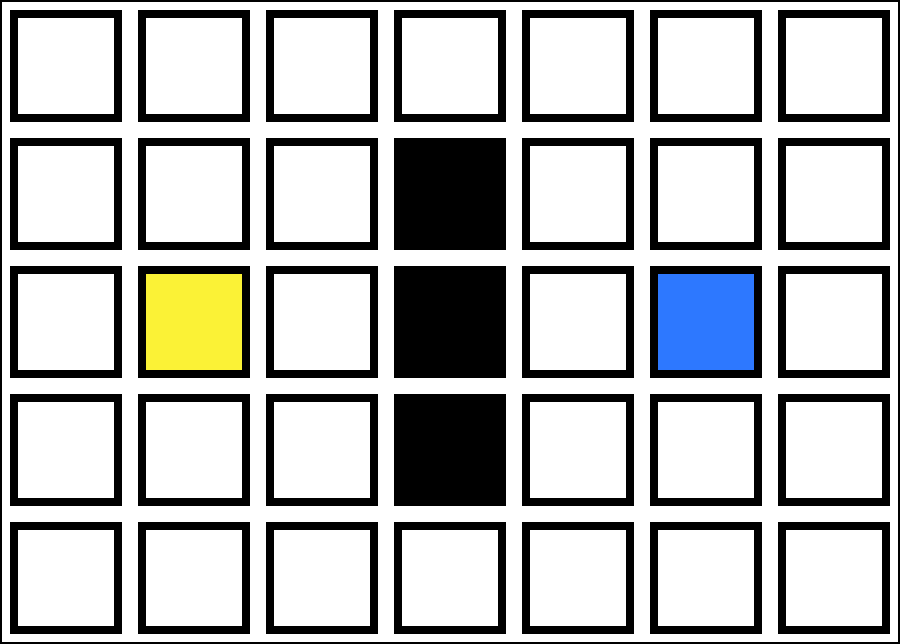
Say we have the following area, where white cells are walkable, black cells are obstacles and can’t be passed, yellow is the start, and blue is the goal:
Algorithm description:
First of all, the ideal data structure here is a priority queue, but since C# doesn’t provide one, a linked list works too, just a bit slower. We need an Open list and a Close list.
- Put the initial node (the start) into the Open list
- While the Open list is not empty:
- Find the node with the smallest F value in the Open list and make it the current node
- Remove the current node from the Open list
- Add the current node to the Close list
- Find all valid neighbors of the current node (up, down, left, right; within bounds and not obstacles)
- Iterate over all the neighbors:
- If the neighbor is not in the Open list
- If the neighbor is not in the Close list either, set the neighbor’s predecessor to the current node, set the neighbor’s G to the current node’s G + 1, and add the neighbor to the Open list
- Otherwise, do nothing
- Otherwise, the neighbor is already in the Open list. If the current node’s G is smaller than the G of the neighbor’s predecessor, update the neighbor’s predecessor to the current node and set the neighbor’s G to the current node’s G + 1.
- If the neighbor is not in the Open list
- If the goal is in the Open list, return the goal node directly
- Return null
If that’s hard to follow, here’s an animation to demonstrate:
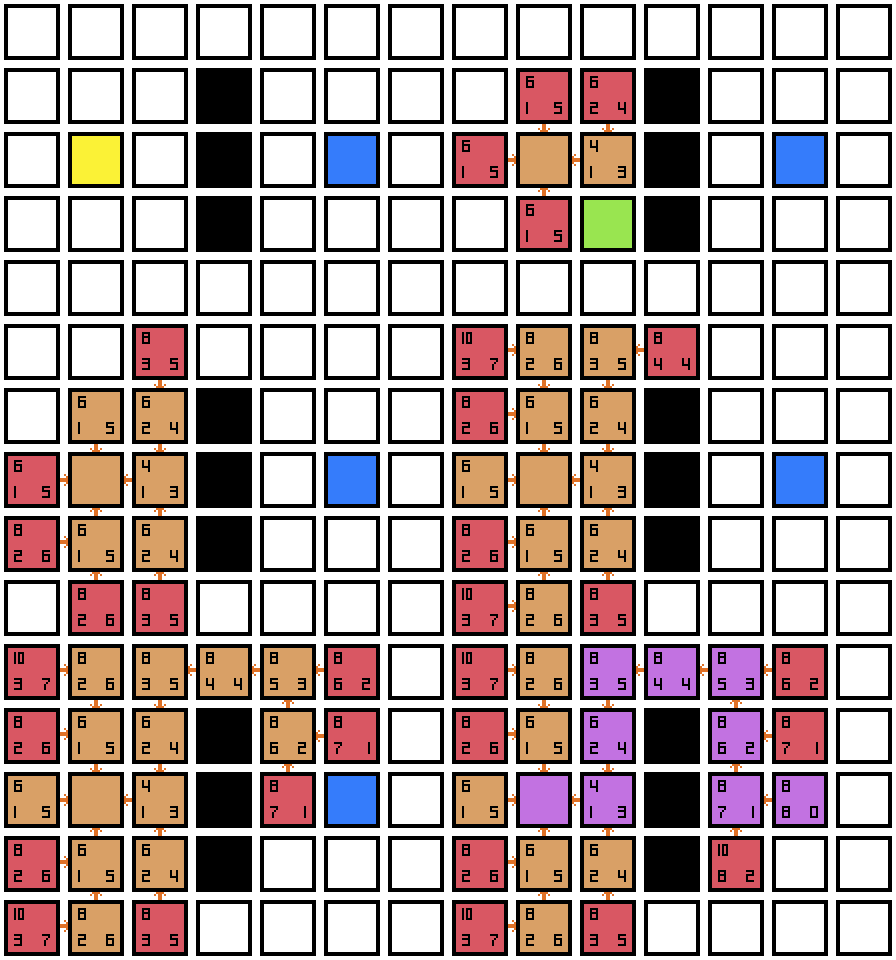
The value in the bottom-left corner of each cell is G, the bottom-right is H, and the top-left is F (F = G + H). For any cell, H is fixed, so it doesn’t need to be stored in the node. G, however, can be updated, so it should be a property of the node. F doesn’t need to be stored either, since it can be computed directly as G + H. Each cell also needs to record its predecessor.
A cell marked green is a neighbor of the current node.
A cell marked red is a neighbor that has been added to the Open list, with its predecessor set to the current node.
A cell marked light brown is the node with the currently smallest F value, which has been removed from the Open list and added to the Close list.
A cell marked purple is a path node. Starting from the goal, each path node finds the next path node through its predecessor, until we reach the start (since the start has no predecessor).
In this example, no G value ever gets updated.
Here’s another example where a G value does get updated:
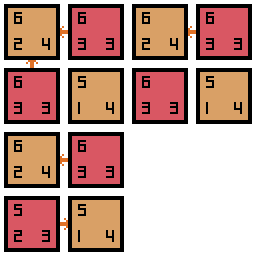
If the G value of the predecessor (6 2 4) of the current node (5 1 4)’s neighbor (6 3 3, the one on the left) is larger than the current node’s G value, the neighbor’s predecessor is changed to the current node and its G value is updated as well.
Without updating G values, the path A* finds may not be optimal; it may take a “detour” instead.
Implementing A* in Unity#
GitHub source code:
To be continued
Comments