This post was translated from the original with AI assistance. Read the original
What is an exception? How do you catch one? How do you define an exception class? How do you throw one? How do you get an exception’s properties? This time I’m summarizing what CLR via C# says about the exception mechanism.
Notes on the Exceptions Chapter of CLR via C##
What Is an Exception#
My understanding of exceptions: if a method can’t complete the task it’s supposed to complete, it should throw an exception (Exception).
Note the wording: it can’t complete its task properly. That means the method may get halfway through what it’s doing, and then, because of any number of possible errors, it can’t carry on with the rest. At that point the program ought to signal that something went wrong and where, and then find a way to resolve the error and recover.
That’s why most high-level languages provide an exception handling mechanism to help programmers deal with exceptions and make their programs more robust.
How to Handle Exceptions#
C# provides a mechanism for handling exceptions. Microsoft gave C#’s exception handling four dedicated keywords: try, catch, finally and throw.
Generally speaking, the standard usage of exception handling looks like this:
private void SomeMethod()
{
    try
    {
        // Put code requiring graceful recovery and/or cleanup operations here
    }
    catch (InvalidOperationException)
    {
        // Put code that recovers from an InvalidOperationExciption here
    }
    catch (IOException)
    {
        // Put code that recovers from an IOException here
    }
    catch
    {
        // Put code that recovers from all exceptions other than those above here
        ...
        // When catching any exception, you usually re-throw it.
        throw;
    }
    finally
    {
        // Put code that cleans up any operations started within the try block here
        // The code here ALWAYS executes, regardless of whether an exception is thrown
    }
    // Code below executes if no exception is thrown in the try block, or if a catch block
    // catches an exception and doesn't throw or re-throw an exception
    ...
}
The Relationship Between try, catch and finally#
A try block must be paired with a catch block or a finally block. A lone try block is meaningless, and C# doesn’t allow it.
For example,
try
{
    //...
}
catch
{
    //...
}
and
try
{
    //...
}
finally
{
    //...
}
are both allowed.
Whereas
try
{
    //...
}
a lone try like this is not allowed.
A try block can be associated with zero or more catch blocks. If the code in the try block doesn’t throw, the CLR skips all its associated catch blocks; if there’s a finally block, it runs it directly, and then runs the statements after the finally block.
The CLR searches the catch blocks matching a try block from top to bottom, so when writing code, the catch blocks we define from top to bottom should go from the most specific exception type to the most general. If you don’t, the C# compiler reports an error, because a specific catch block placed at the bottom would be completely unreachable.
If none of the catch blocks matching the try catch the same type as the thrown exception, the CLR goes up one level in the call stack and keeps searching.
Call stack: the method call stack, which tracks the order of calls and returns between methods. The higher up a method is, the earlier it was called and the later it returns.
If no matching catch block is found all the way up to the top of the call stack, an unhandled exception occurs.
If a matching catch block is found, then all the code in the finally blocks between the try block that threw the exception and the catch block that matched it (between: not including the finally block after the matching catch block) is executed.
Once all the inner finally blocks have run, the code in the matching catch block runs, and finally the code in the finally block after that catch block.
There are three common things to do in a catch:
- Re-throw the exception
- Throw a new exception
- Exit the current catch block and go into the finally block (if there is one)
For the call stack behavior above, here’s a small example:
class Program
{
    static void Method1()
    {
        try
        {
            Console.WriteLine("Method1 Try");
            Method2();
        }
        catch (DivideByZeroException e)
        {
            Console.WriteLine("[Method1 Catch]: " + e.ToString());
        }
        finally
        {
            Console.WriteLine("Method1 Finally");
        }
    }

    static void Method2()
    {
        try
        {
            Console.WriteLine("Method2 Try");
            Method3();
        }
        catch (IOException e)
        {
            Console.WriteLine("[Method2 Catch]: " + e.ToString());
        }
        finally
        {
            Console.WriteLine("Method2 Finally");
        }
    }

    static void Method3()
    {
        try
        {
            Console.WriteLine("Method3 Try");
            int a = 1;
            int b = a / 0;
        }
        catch (ArgumentException e)
        {
            Console.WriteLine("[Method3 Catch]: " + e.ToString());
        }
        finally
        {
            Console.WriteLine("Method3 Finally");
        }
    }

    static void Main(string[] args)
    {
        Method1();
        Console.ReadKey();
    }

}
The result:
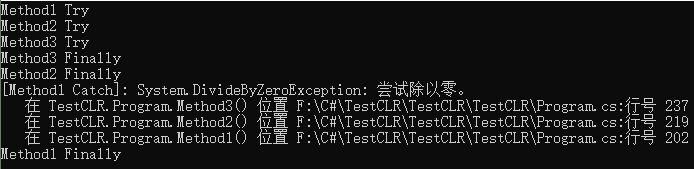
In this example, the line int b = a / 0; in Method3 causes a System.DivideByZeroException to be thrown. But Method3 doesn’t catch it, so the CLR goes to its caller, Method2, looking for a catch that matches DivideByZeroException. Still nothing, so it goes to Method2’s caller, Method1 — and there it finally finds one. Then the finally blocks are executed from the inside out, but the level that caught the exception is a bit special: it first runs the matching catch block (here, printing e.ToString()), and then runs the finally block after that catch block.
If no matching catch block is found, an unhandled exception occurs and the thread is terminated.
Now let’s talk about finally. A finally always corresponds to a try, no question about that. And a try can have at most one finally. So, is the code in a finally guaranteed to run? That depends on the situation.
Whether finally Gets Executed#
First, let’s look at some characteristics of finally.
Some Characteristics of finally#
- When you use a lock statement, the lock is released in a finally block.
- When you use a using statement, the object’s Dispose method is called in a finally block.
- When you use a foreach statement, the IEnumerator object’s Dispose method is called in a finally block
- When you define a finalizer method, the base class’s Finalize method is called in a finally block
Back to whether finally gets executed. There are roughly three cases:
For ordinary thread termination or AppDomain unloading, the contents of the finally block are guaranteed to run.
Let’s look at what happens with an unhandled exception (an unhandled exception throws a ThreadAbortException and aborts the thread):
We change Method1 in the example above so that it no longer catches DivideByZeroException, and create a file with File.Create in each finally block (the reason for not using Console is that when the thread terminates, the Console’s handle has already been killed or is still held, so we can’t run the test and compare results):
class Program
{
    static void Method1()
    {
        try
        {
            Console.WriteLine("Method1 Try");
            Method2();
        }
        catch (IOException e)
        {
            Console.WriteLine("[Method1 Catch]: " + e.ToString());
        }
        finally
        {
            File.Create("Method1Finally.txt");
            Console.WriteLine("Method1 Finally");
        }
    }

    static void Method2()
    {
        try
        {
            Console.WriteLine("Method2 Try");
            Method3();
        }
        catch (IOException e)
        {

            Console.WriteLine("[Method2 Catch]: " + e.ToString());
        }
        finally
        {
            File.Create("Method2Finally.txt");
            Console.WriteLine("Method2 Finally");
        }
    }

    static void Method3()
    {
        try
        {
            Console.WriteLine("Method3 Try");
            int a = 1;
            int b = a / 0;
        }
        catch (ArgumentException e)
        {
            Console.WriteLine("[Method3 Catch]: " + e.ToString());
        }
        finally
        {
            File.Create("Method3Finally.txt");
            Console.WriteLine("Method3 Finally");
        }
    }

    static void Main(string[] args)
    {
        Method1();
        Console.ReadKey();
    }

}
Switch to Release, rebuild the solution, and run it in Release mode. The folder contents before running:
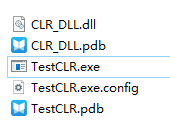
The output and the folder contents after running:
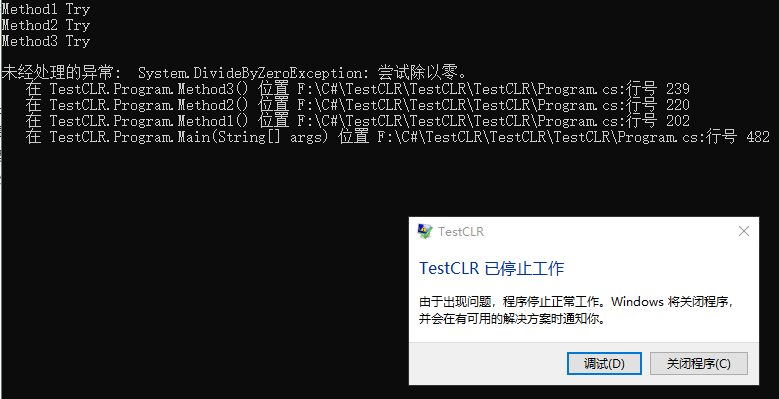
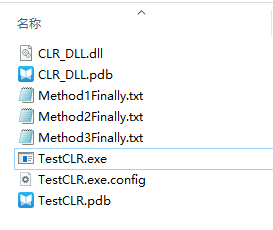
Even though the thread was terminated, the finally blocks still ran.
If you use some method that forcibly terminates the thread manually (e.g. System.Environment.FailFast), none of the finally blocks that should have run after that forced-termination statement will run.
class Program
{
    static void Method1()
    {
        try
        {
            Console.WriteLine("Method1 Try");
            Method2();
        }
        catch (DivideByZeroException e)
        {
            Console.WriteLine("[Method1 Catch]: " + e.ToString());
            System.Environment.FailFast("Method1 prevents all the following finally blocks from running");
        }
        finally
        {
            File.Create("Method1Finally.txt");
            Console.WriteLine("Method1 Finally");
        }
    }

    static void Method2()
    {
        try
        {
            Console.WriteLine("Method2 Try");
            Method3();
        }
        catch (IOException e)
        {

            Console.WriteLine("[Method2 Catch]: " + e.ToString());
        }
        finally
        {
            File.Create("Method2Finally.txt");
            Console.WriteLine("Method2 Finally");
        }
    }

    static void Method3()
    {
        try
        {
            Console.WriteLine("Method3 Try");
            int a = 1;
            int b = a / 0;
        }
        catch (ArgumentException e)
        {
            Console.WriteLine("[Method3 Catch]: " + e.ToString());
        }
        finally
        {
            File.Create("Method3Finally.txt");
            Console.WriteLine("Method3 Finally");
        }
    }

    static void Main(string[] args)
    {
        Method1();
        Console.ReadKey();
    }

}
In the code above, after Method1’s catch finishes, the corresponding finally block should run, but because the catch calls System.Environment.FailFast, that finally block never runs. The finally blocks of Method2 and Method3, however, do run, because they had already executed before FailFast was called.
The result:
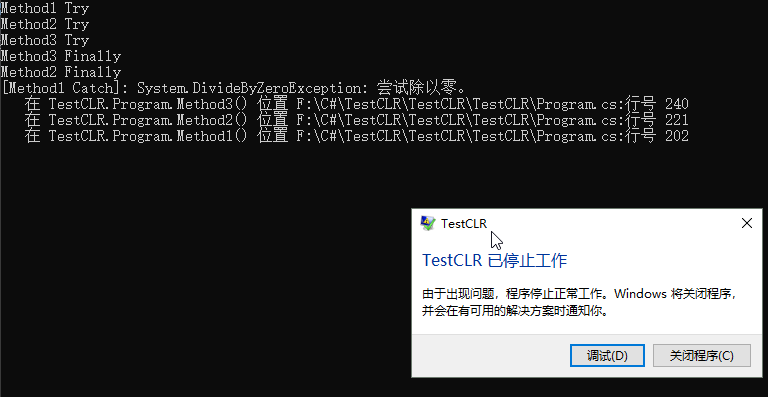
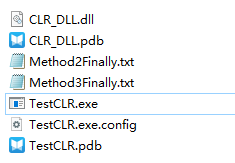
As you can see, there’s no Method1Finally.txt.
If there’s a return inside try or catch, the finally still runs first, and then the method returns.
The System.Exception Class#
System.Exception is the base class of most exception classes in C# (a few special cases don’t follow this). Classes derived from System.Exception are considered CLS-compliant.
It has some key properties:
| Property | Access | Type | Description |
|---|---|---|---|
| Message | Read-only | String | Contains helpful text explaining why the exception was thrown. If a thrown exception goes unhandled, this message is usually written to a log. Since end users typically don’t see this message, it should give as many technical details as possible, so developers can use the information it provides to fix the code when building a new version of the assembly. |
| Data | Read-only | IDictionary | A reference to a collection of key/value pairs. Usually, code adds entries to this collection before throwing the exception; code that catches the exception can query the entries and use the information during exception recovery |
| Source | Read/write | String | Contains the name of the assembly that generated the exception |
| StackTrace | Read-only | String | Contains the names and signatures of all the methods called before the exception was thrown. This property is very useful for debugging |
| TargetSite | Read-only | MethodBase | Contains the method that threw the exception |
| HelpLink | Read-only | String | Contains a URL to documentation that can help a user understand the exception. Keep in mind, though, that sound programming and security practices prevent users from ever seeing raw unhandled exceptions, so unless you are trying to convey information to other programmers, this property is seldom used |
| InnerException | Read-only | Exception | If the current exception was thrown while handling another exception, this property indicates what the previous exception was. This read-only property is usually null. The Exception type also offers a public GetBaseException method that walks the linked list of inner exceptions and returns the originally thrown exception |
| HResult | Read/write | Int32 | A 32-bit value used when crossing the boundary between managed and native code. For example, when a COM API returns a failure HRESULT, the CLR throws an Exception-derived object and maintains the HRESULT value via this property |
We often output error information using Message or Exception’s ToString() instance method.
Actually, Exception’s ToString() is implemented internally like this:

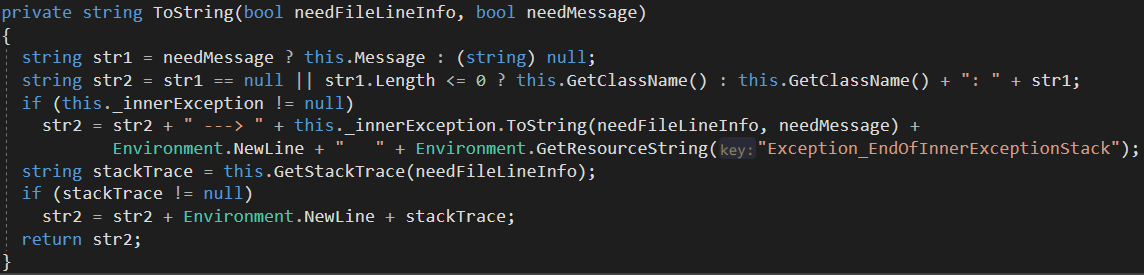
Exception’s ToString uses the Message property to get the error message, and the GetStackTrace method to get the stack trace.
In other words, ToString needs the Message information and the stack trace information by default.
And this GetStackTrace is exactly the method used by the StackTrace property:
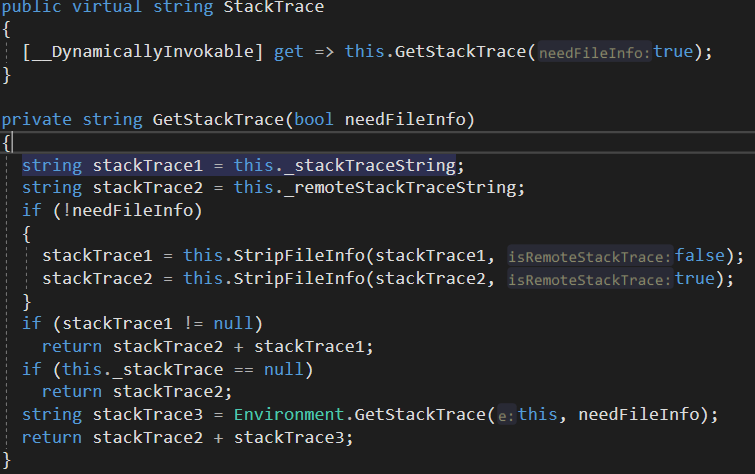
There are two private fields related to StackTrace: _stackTraceString and _remoteStackTraceString.
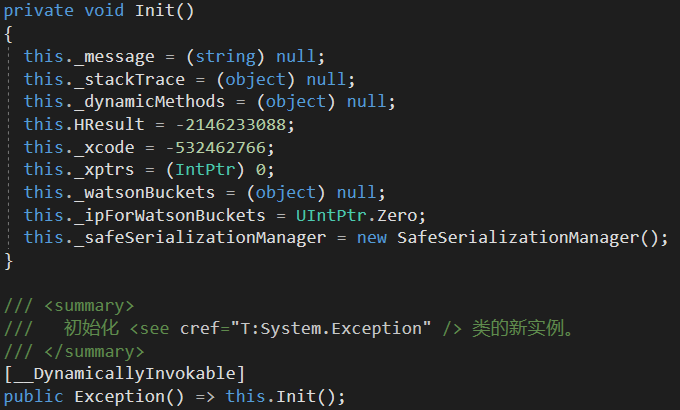
_stackTraceString is set to null when a new Exception instance is created:
_remoteStackTraceString is set when an instance of the Exception class is deserialized:
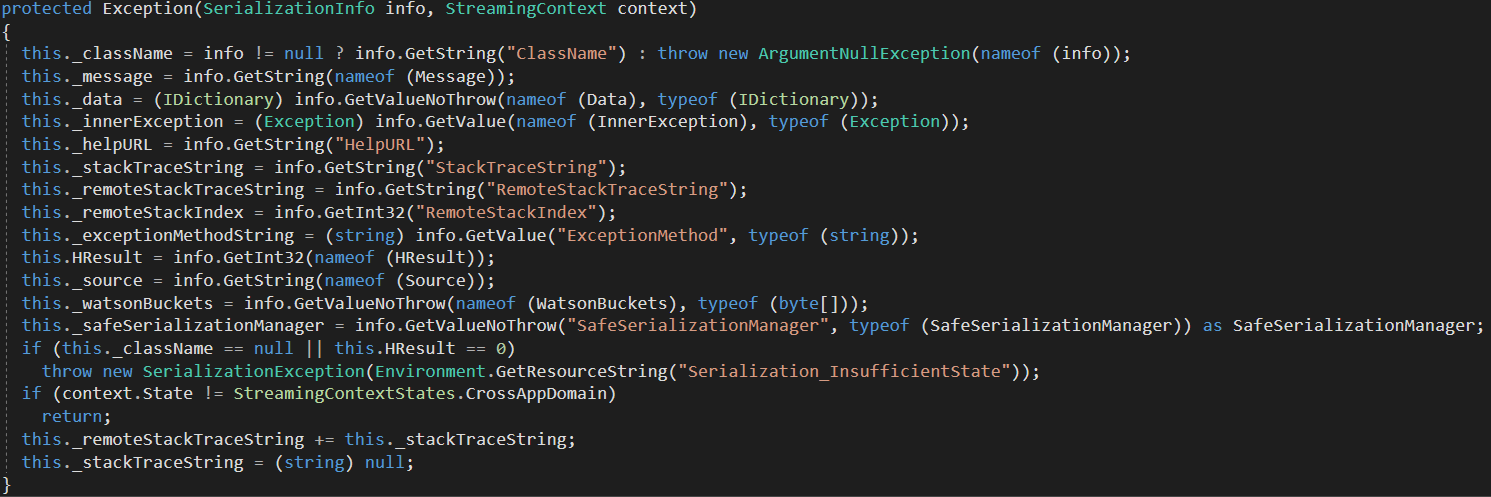
As you can see, it gets the RemoteStackTraceString stored in the serialization info, and then += the StackTraceString stored in the serialization info. This way, unlike _stackTraceString, which is reset to null in the constructor every time, it preserves all the stack trace information across multiple rounds of serialization and deserialization.
We know that when objects are marshaled across AppDomains, they get serialized and deserialized, so when an exception is thrown/caught across AppDomains, the special Exception constructor above gets called.
How to Throw Exceptions#
C# provides the throw keyword for throwing exceptions.
throw;

throw e;

throw new IOException();
The difference between a bare throw and throwing an Exception instance is: the former isn’t treated as the origin of the exception, while the latter is.
As for what exception to throw, where to throw it, and what string argument to pass in the exception, those are questions worth thinking about further. I won’t go into detail here, since it really depends on the specific situation.
Custom Exception Classes#
Take the implementation of GameFrameworkException in GameFramework as an example:
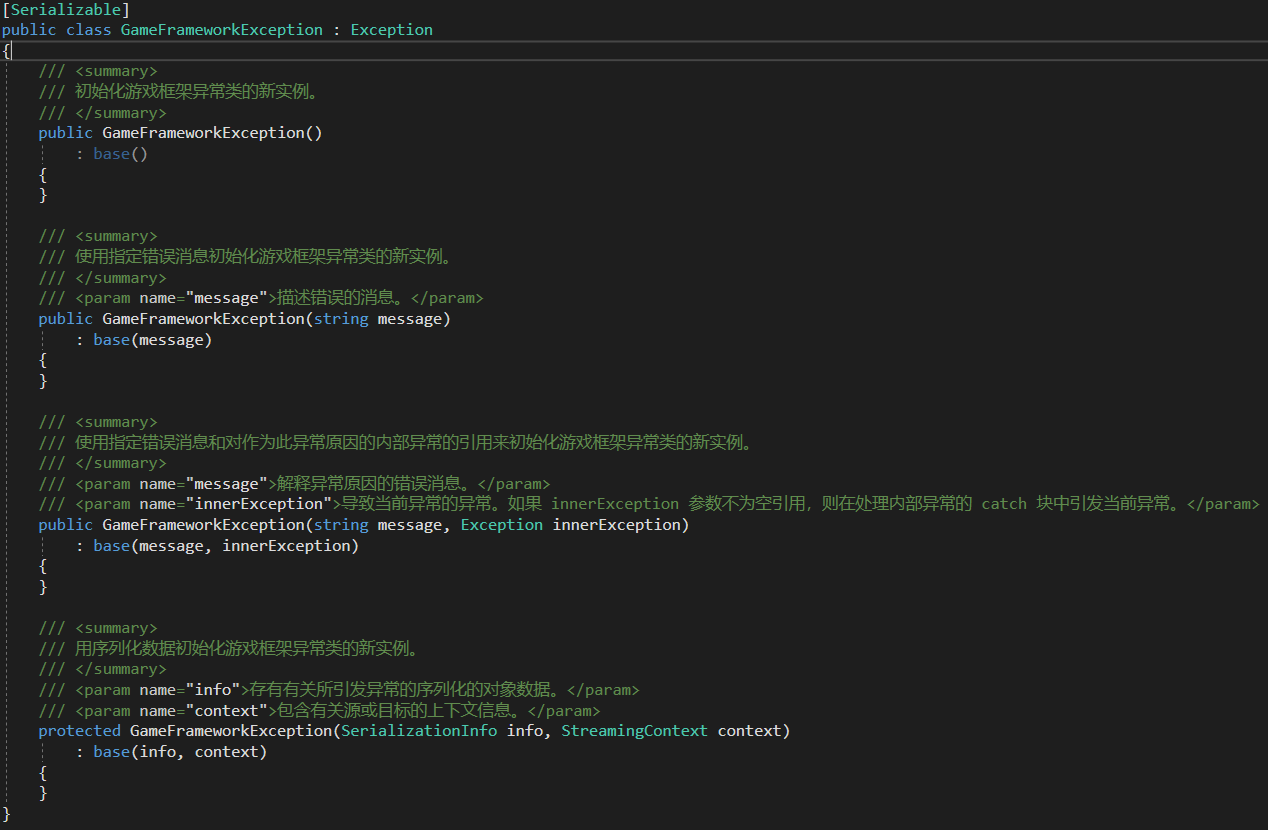
A custom exception class should implement at least four constructors, and must also be marked with the Serializable attribute.
Of course, some of the virtual properties (e.g. Message) and virtual methods (e.g. Equals, ToString, etc.) in the Exception class can be overridden however you like.
You can also define a generic exception class like the example in CLR via C#. See p413.
Some Special Cases#
Handling Exceptions Thrown in Multiple Threads#
Can an exception thrown in a thread only be caught by that thread itself, or can other threads catch it too?
class Program
{
    static void TestThreadMethod()
    {
        try
        {
            Console.WriteLine("Thread Try");
            int a = 1;
            int b = a / 0;
        }
        catch (IOException e)
        {
            Console.WriteLine("[Thread Catch]: " + e.ToString());
        }
        finally
        {
            File.Create("ThreadFinally.txt");
            Console.WriteLine("ThreadFinally Finally");
        }
    }

    static void Main(string[] args)
    {
        try
        {
            Thread t = new Thread(TestThreadMethod);
            t.Start();
        }
        catch (DivideByZeroException e)
        {
            Console.WriteLine(e.ToString());
        }
        Console.ReadKey();
    }

}
Will the catch in the Main method catch the exception thrown in thread t?
Result:
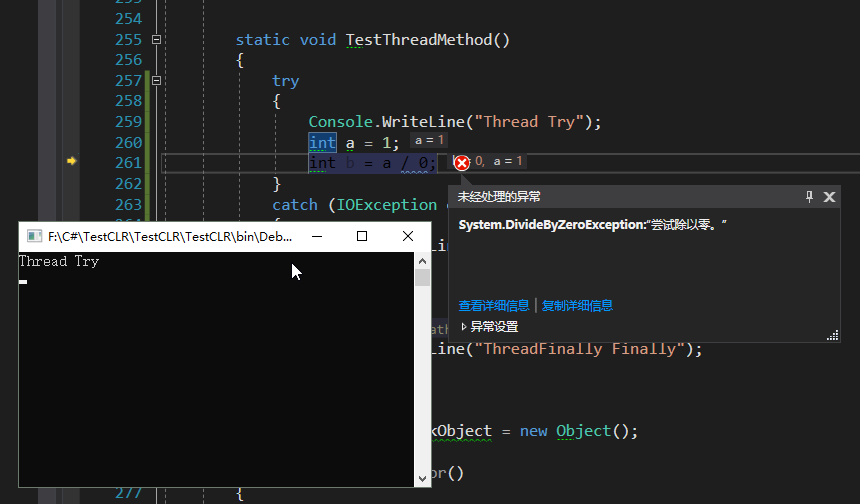
It goes straight to an unhandled exception.
So when handling exceptions with multiple threads, an exception thrown in a thread is generally handled by that thread itself, because other threads have no idea when that thread will throw.
Comments