This post was translated from the original with AI assistance. Read the original
A whole page of CLR via C#, p110, is devoted to “how the CLR controls the layout of a type’s fields”.
Let’s take a careful look at the concrete use cases for each of the different LayoutKind options in StructLayoutAttribute.
Type Field Layout and StructLayoutAttribute#
A type’s field layout is how its fields are arranged in memory. Should the C# compiler pick the optimal layout by itself, lay the fields out in their current order, or use custom field offsets? All of this is up to you (C# has a default choice too, of course). Different scenarios call for different approaches. If you pick the wrong one, you may run into problems like “high memory overhead and lower performance” or “platform invoke failing because of mismatched memory layout and alignment”.
You can apply the C# System.Runtime.InteropServices.StructLayoutAttribute attribute to the classes or structs you define.
There are three options:
- LayoutKind.Auto: the compiler lays things out automatically
- LayoutKind.Sequential: layout follows the order in which fields are defined
- LayoutKind.Explicit: you set the layout with custom field offsets
LayoutKind.Auto: Better Performance#
If you’re not interoperating with unmanaged code, LayoutKind.Auto is a good choice
Let’s look at an example:
[StructLayout(LayoutKind.Auto)]
struct StructAuto
{
    public int a;
    public bool b;
    public int c;
    public double d;
}

[StructLayout(LayoutKind.Sequential)]
struct StructSequential
{
    public int a;
    public bool b;
    public int c;
    public double d;
}
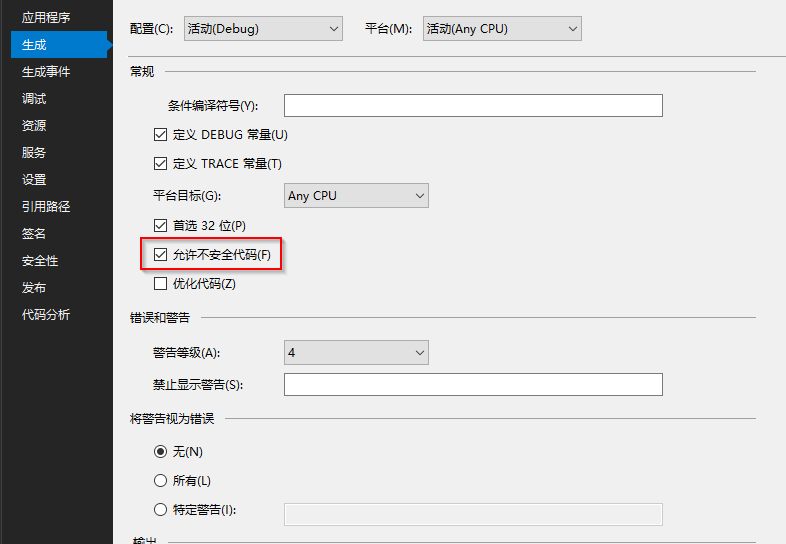
To examine how memory is allocated for value-type variables, you need to turn on the /unsafe switch. In VS, open the project settings, click “Build”, and tick “Allow unsafe code”:
Get the memory addresses with an unsafe block:
Console.WriteLine("size of bool : " + sizeof(bool) + "byte(s)");
Console.WriteLine("size of int : " + sizeof(int) + "byte(s)");
Console.WriteLine("size of double : " + sizeof(double) + "byte(s)");
unsafe
{
    Console.WriteLine("StructAuto:");
    StructAuto sa = new StructAuto();
    Console.WriteLine("address of a : 0x{0}", ((int)&sa.a).ToString("X"));
    Console.WriteLine("address of b : 0x{0}", ((int)&sa.b).ToString("X"));
    Console.WriteLine("address of c : 0x{0}", ((int)&sa.c).ToString("X"));
    Console.WriteLine("address of d : 0x{0}", ((int)&sa.d).ToString("X"));
    Console.WriteLine("StructSequential:");
    StructSequential ss = new StructSequential();
    Console.WriteLine("address of a : 0x{0}", ((int)&ss.a).ToString("X"));
    Console.WriteLine("address of b : 0x{0}", ((int)&ss.b).ToString("X"));
    Console.WriteLine("address of c : 0x{0}", ((int)&ss.c).ToString("X"));
    Console.WriteLine("address of d : 0x{0}", ((int)&ss.d).ToString("X"));
}
Result:
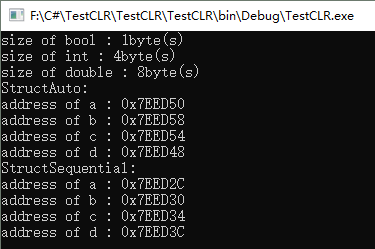
Here’s the memory allocation of these two struct variables drawn as a memory diagram:
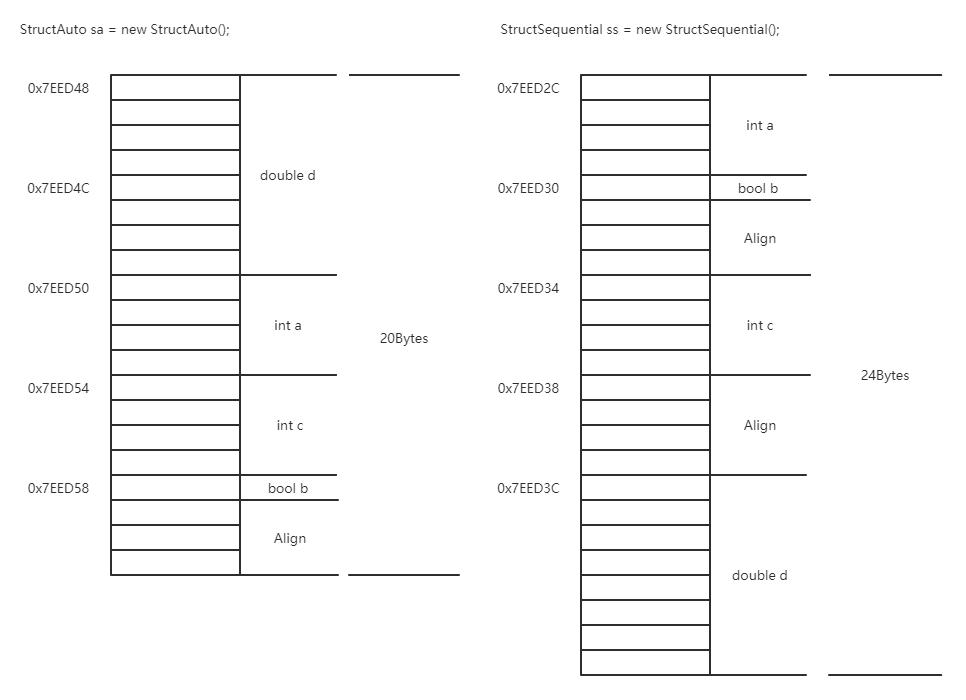
As you can see, LayoutKind.Auto lays out and aligns the fields in the most memory-efficient way. This layout is provided automatically by the compiler — it’s the optimal field layout the compiler finds on its own — so the order of fields in memory may differ from the order in which they were defined.
LayoutKind.Sequential, on the other hand, lays out and aligns fields in memory in the order you defined them, using the same alignment rules as C++ structs: alignment is to a multiple of the largest field size (in this example the largest is double at 8 bytes, so the padded size should be a multiple of 8, which here is 24 bytes).
In general, if you’re not interoperating with unmanaged code, LayoutKind.Auto saves space and performs better. If you need to interoperate with other unmanaged code (e.g. C++) — say you’re calling a function in a DLL compiled from unmanaged C++ that takes a struct — then that struct must be declared on the C# side with LayoutKind.Sequential to keep the same layout and alignment as C++, so nothing goes wrong. Of course, the C# compiler uses LayoutKind.Sequential for structs by default, so if you happen to be interoperating with unmanaged C++, you’re all set; if you don’t need to talk to unmanaged code and want more efficiency, LayoutKind.Auto is a good choice.
LayoutKind.Sequential: Interoperating with Unmanaged C++#
LayoutKind.Sequential is required when interoperating with unmanaged C++.
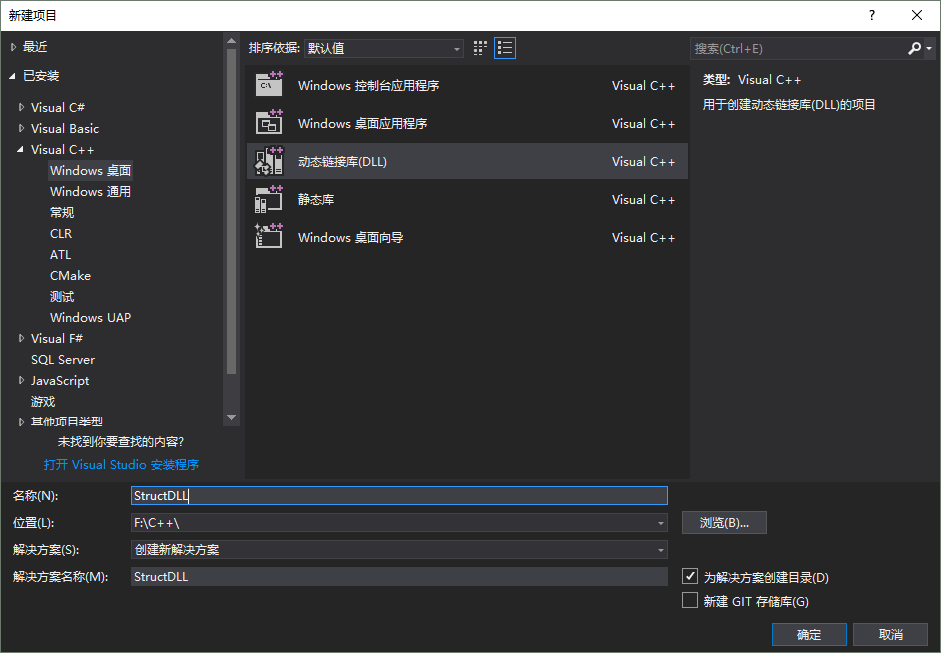
Create a new C++ (non-CLI) DLL project:
Then add the struct and the methods to export in StructDLL.cpp (with extern “C”, the function’s entry point is just the function name; otherwise it’s a long string with other parameter decorations. This only makes the function easy to find when there are no overloads):
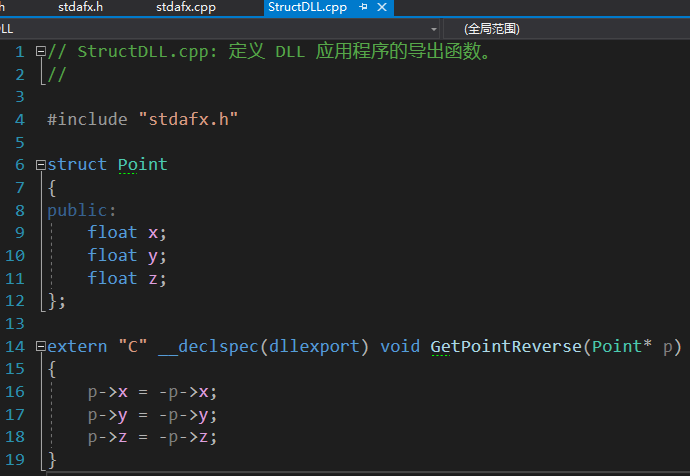
What the function above does is negate all of x, y and z of the Point passed in.
Build the solution to get StructDLL.dll, and copy it into the bin/Debug directory of the C# CLR project.
In the C# CLR project, import the GetPointString method from this DLL:

Reference for mapping C++ types to C# types: https://www.cnblogs.com/zhangweizhong/p/8119395.html
Test it:
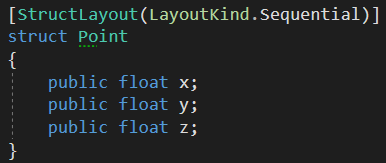
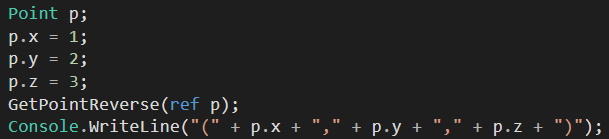
Result:
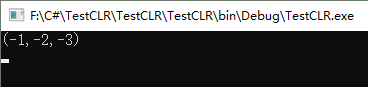
The call succeeds.
What if Point used Layout.Auto as its layout? Let’s see:
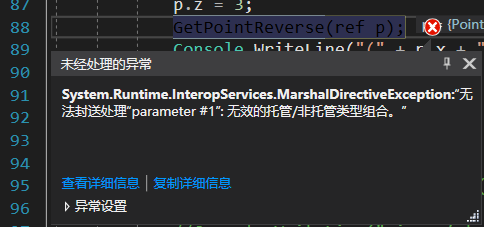
An exception is thrown, saying it’s an “invalid managed/unmanaged type combination”. What’s certain is that because the memory layout and alignment no longer match C++, the argument can’t be passed in the required form, so the call fails and an exception is thrown.
LayoutKind.Explicit: More Flexibility#
LayoutKind.Explicit is suited to scenarios with precise requirements on memory layout and offsets
LayoutKind.Explicit requires every field to declare an offset:
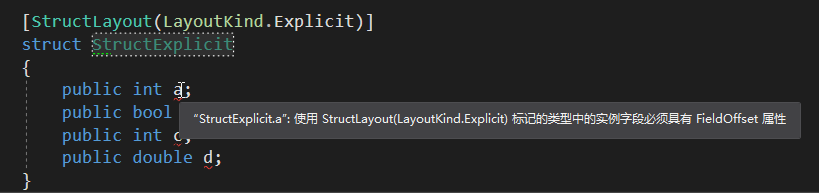
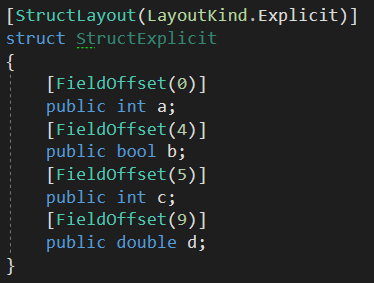
Something like this satisfies the requirement:
Let’s test it:
unsafe
{
    Console.WriteLine("StructExplicit:");
    StructExplicit se = new StructExplicit();
    Console.WriteLine("address of a : 0x{0}", ((int)&se.a).ToString("X"));
    Console.WriteLine("address of b : 0x{0}", ((int)&se.b).ToString("X"));
    Console.WriteLine("address of c : 0x{0}", ((int)&se.c).ToString("X"));
    Console.WriteLine("address of d : 0x{0}", ((int)&se.d).ToString("X"));
}
Result:
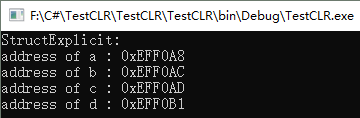
You can see that this struct isn’t aligned in memory, because all the offsets are defined by us.
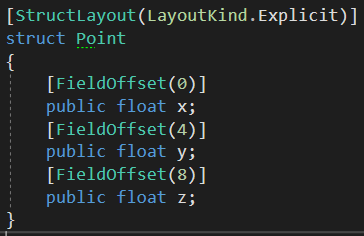
So in theory, using this approach to control the layout of the Point struct from the LayoutKind.Sequential example above should also work. Let’s test it:
Since a float takes 4 bytes, the field offsets here should be 0, 4 and 8.
Result:
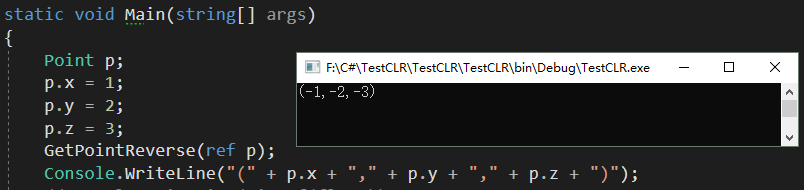
The call succeeds.
What if we don’t follow C++’s alignment and define them as 0, 5, 10? In theory it should error out. Let’s test it:

No error. Let’s draw a memory diagram to analyze it:
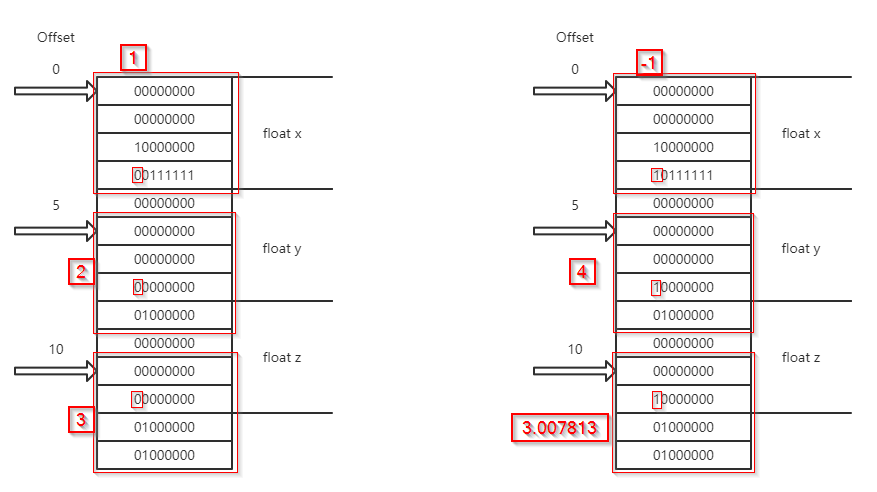
Following the memory layout on the C# side, the data sent to C++ (the DLL) is the block at offsets 0-11. C++ negates the three fields at offsets 0-3, 4-7 and 8-11 (flipping the highest bit from 0 to 1 or from 1 to 0), and once that’s done, sends it back to C#. C# then parses it according to its own memory layout, so the data it gets is wrong — but there’s no error, because it’s just the data that’s wrong. (See the figure above.)
What scenario really needs this kind of feature? The answer is the union in C/C++.
Unlike a struct, a union’s members share the same memory address. In other words, every field’s offset is 0.
In that case,
[StructLayout(LayoutKind.Explicit)]
struct UnionSimulation
{
    [FieldOffset(0)]
    public int a;
    [FieldOffset(0)]
    public bool b;
    [FieldOffset(0)]
    public char c;
}
can simulate a C/C++ union:
union UnionData{
    int a;
    bool b;
    char c;
};
This way, if a function in a DLL compiled from unmanaged C++ needs a union as a parameter, we can simulate it with LayoutKind.Explicit, just setting all the field offsets to 0.
References:
https://www.cnblogs.com/happyhippy/archive/2007/04/17/717028.html
Comments