This post was translated from the original with AI assistance. Read the original
How does Unity manage to be cross-platform? What exactly is the relationship between Mono and the .NET Framework? What is IL? And what are CIL and CLI, those two lookalikes?
In this post I’ll explain these questions that a lot of people are curious about.
My Memories of Unity#
Unity was originally called Unity3D, and it started out as a cross-platform 3D game engine. Later, since its scope was no longer limited to 3D, or even to games, it was renamed Unity.
I first came across Unity in 2013, the year I first got the idea of doing game development. I won’t go into the whole story; let me talk more about the Unity side of things. Back then Unity was at version 4.x, and most people were still using MonoDevelop as their scripting IDE. My impression of Mono at the time was: it’s what you write C# scripts with, and it seems to make cross-platform possible, but I never looked into how Mono actually achieved that. All I remember is that you could export to HTML5, PlayStation 3, Android, Linux, Windows and other platforms, which was really ahead of its time. There really weren’t many engines back then that could span that many platforms. I searched through a lot of material on game engines, and everyone said Unity was a cross-platform 3D game engine with huge potential. At the time the mobile game market was basically split between two engines, Unity and Cocos2D, but Cocos’s cross-platform capability was actually not as good as Unity’s, and Cocos2d-x wasn’t visual either, which was pretty hardcore for a beginner like me. So I picked Unity as the thing to learn going forward. (Though I didn’t end up learning all that much…)
You could say it was thanks to the great Mono project that Unity was able to be cross-platform at all. In fact, there were other game frameworks at the time that used Mono for cross-platform support, like MonoGame and XNA, but their workflows were pure code editing and debugging, which was too hardcore for me back then, so I never considered or looked into them. Mono was the key to going cross-platform at the time.
XNA has been abandoned by Microsoft. If you’re interested, check out FNA, an open-source reimplementation of XNA 4.0.
A Look Back at the Road to Cross-Platform#
The Trouble with Multiple Platforms#
There are more and more different platforms and architectures. A program written on Windows may not run on Linux and may need to be ported. Simply put, you need to “cross-compile,” which is a real pain. C/C++ projects have make/cmake for cross-platform builds, but making projects in other languages cross-platform is very hard.
If Only All Platforms and Instruction Sets Were the Same#
If all platforms and their instruction sets were the same, it seems we wouldn’t need to cross-compile at all. Then we could have “compile once, run anywhere.” Could we simulate such a virtual platform with its own instruction set?
The Birth of the CLI#
To virtualize a common instruction set that could be compiled and executed, the concepts of IL (Intermediate Language) and the JIT (Just In Time) compiler were born. IL is an intermediate language; it’s stack-based and has object-oriented features. JIT is a just-in-time compiler that compiles at runtime. High-level languages are compiled to IL by their respective compilers, and after JIT compilation the IL becomes native code, which can then run on the corresponding native platform.
To have multiple high-level languages compile to a unified IL, the CLI (Common Language Infrastructure) was born. The CLI is a common language specification: as long as a high-level language follows the CLI spec, the IL it compiles to is completely consistent.
Microsoft’s Implementation of the CLI: .NET Framework#
Microsoft’s .NET Framework is one implementation of the CLI. The .NET Framework includes the .NET Framework class library, the CLR (Common Language Runtime), some compilers, and so on. The CLR can be thought of as a virtual machine, and the language that runs in the CLR is called CIL (Common Intermediate Language, also known as MSIL, Microsoft Intermediate Language).
The .NET Framework wasn’t open source back then, and it only ran on Windows.
The Birth of Mono#
Because the .NET Framework was neither open source nor cross-platform, Mono came into being.
Mono, sponsored by Xamarin, is an open-source project. Like the .NET Framework, it’s an implementation of the CLI and conforms to the ECMA standard for C#, but unlike Microsoft’s .NET Framework, Mono is cross-platform.
Mono runs not only on Windows, but also on Mac OS, Linux and some game console/handheld platforms.
Compared with the .NET Framework runtime, Mono has its own Mono VM as its runtime.
Mono’s Architecture#
- Compiler: Mono’s C# compiler is MCS. MCS compiles C# source code into managed modules (EXE/DLL).
- Runtime: JIT, AOT, FULL-AOT, GC, class loader, and so on.
- Base Class Library (BCL)
- Mono class library: provides some classes beyond Microsoft’s .NET with lots of extra features, mainly for building applications on other operating systems.
JIT (Just-in-time): while the program runs, IL (intermediate language) is converted into native code for the corresponding platform, and the native code is mapped into virtual memory and executed.
AOT (Ahead-of-time): before the program runs, parts of the .exe or .dll file are translated into native code for the target platform and stored.
FULL-AOT (Full-Ahead-of-time): before the program runs, all code is fully compiled into native code for the target platform.
The GC uses Boehm garbage collection and generational collection, unlike the CLR.
The Relationship Between Mono and .NET Framework in Unity#
Mono and the .NET Framework follow the same standard, but Mono offers somewhat fewer features.
Generally, DLLs compiled with the .NET Framework can be used as plugins in Unity. But note that the base class library Mono uses is different from the one provided by the .NET Framework; they live in different assemblies.
How Mono Goes Cross-Platform#
Mono’s C# compiler (MCS) compiles C# code into IL (intermediate language, conforming to the ECMA CLI spec). Then the Mono runtime provides a JIT or AOT compiler that compiles the IL into native code for the corresponding platform at runtime. Finally, each platform executes its own compiled native code, which is how it achieves cross-platform support.
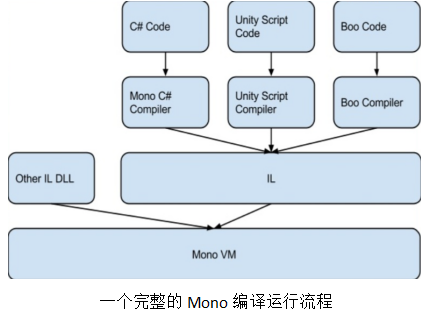
Why Unity Is Cross-Platform#
After all that, you can see: Mono can do cross-platform. And since Unity uses Mono for compilation, it can naturally be cross-platform too. But over time Mono started to run into some problems. What would Unity come up with in response?
Unity Later On and IL2CPP#
Later, iOS banned JIT compilation, which directly meant Mono could no longer export iOS apps. Mono also had performance issues and licensing issues.
Unity gradually realized this and had to come up with a new approach. That new approach was IL2CPP.
As the name suggests, IL2CPP converts IL (the intermediate language) into CPP files. The generated CPP files are then compiled, with a C++ compiler and the libil2cpp library, into native binary executables.
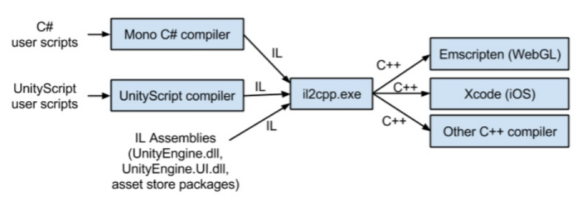
First, Mono’s C# compiler compiles the high-level language into IL. Then IL2CPP.exe compiles the IL into C++ code, which each platform’s C++ compiler then compiles directly into native executable assembly code that runs on the IL2CPP VM.
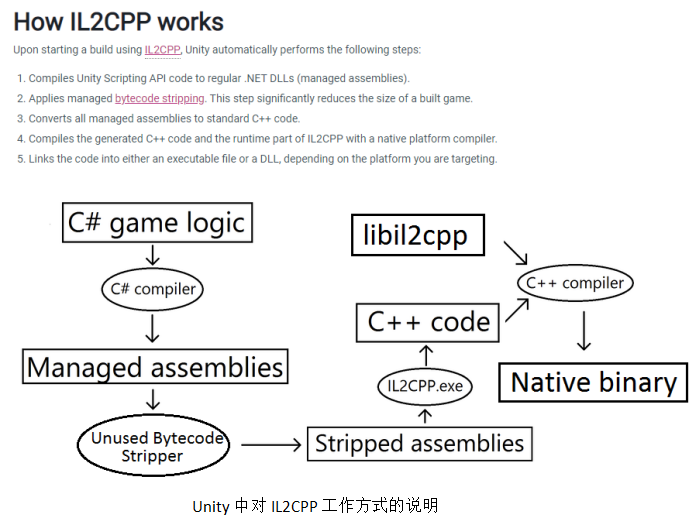
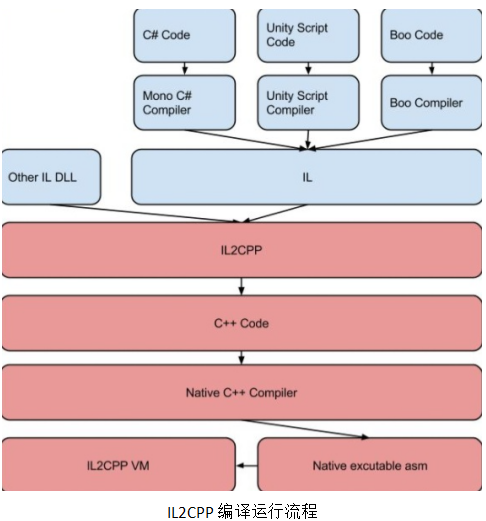
The IL2CPP VM in the last step is a memory manager responsible for service-type work such as GC management and thread creation. But because IL loading and dynamic resolution are removed, the IL2CPP VM can be made very small, and game load times are shorter.
As for the different platforms: platforms other than iOS use JIT, while on iOS the IL code is converted into target code at compile time, using FULL-AOT. Overall, Unity’s cross-platform support currently relies on Mono. On iOS, generating native code at runtime isn’t allowed, because JIT is banned on iOS, so the approach above uses Full-AOT mode: IL2CPP first converts all IL into C++ code, and since C++ can be compiled and run cross-platform, this effectively solves the iOS problem.
Unity lets you switch the compilation backend (Mono or IL2CPP).
How Unity Mobile Games Are Compiled and Built Today#
Most Unity mobile games today go through this pipeline:
C# source code -> Mono C# compiler -> IL -> IL2CPP -> C++ code -> LLVM -> native code
LLVM is a framework for building compilers, written in C++. It’s used to optimize the compile-time, link-time, run-time and idle-time of programs written in any programming language. It’s open to developers and compatible with existing scripts. Simply put, here it’s used to optimize for Android and iOS.
Looking Ahead#
Technology is always evolving. Will a new concept or a new tool appear in the future that makes cross-platform even simpler and more efficient? Let’s wait and see. I’m sure that as we keep learning, there will always be new technologies that make you go “wow.”
Thanks#
Thanks to Brother Duan for gathering the materials for me; they were really thorough!
Comments