This post was translated from the original with AI assistance. Read the original
Note
The server behind the API in this post was shut down long ago, so the addresses in the code no longer work and are kept for the record. The follower badges shown on this page now read Bilibili’s official API directly: https://api.bilibili.com/x/relation/stat?vmid=<uid> (JSON key $.data.follower).
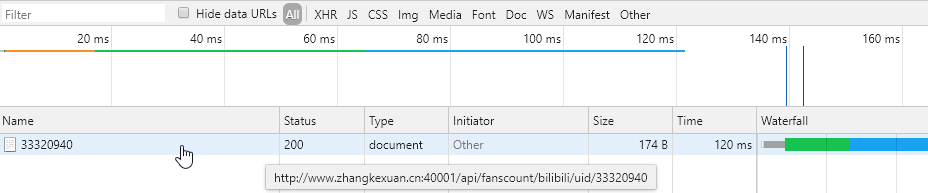
Subsats is still painfully slow. My guess is the author scrapes everything with Selenium. Why use Selenium when plain requests would do? So I decided to build a similar API service myself. I’ve already finished the service for getting bilibili follower counts. Check out the loading speed comparison (only the first load really counts; after that things may be cached and there’s no point comparing. The left one uses my own API, the right one uses Subsats):


What “reinventing the wheel” means:
Reinventing the wheels
Features, libraries or code blocks that can be used directly are usually compared to wheels. The point of me reinventing one is that, even though the existing ones work fine for me, I relearn it and write the code all over again so that I fully understand the principles behind the wheel.
In this project, Subsats is the wheel, and I’m going to build something similar. But there’s no need for me to build everything completely from scratch; I can still use Python packages like fastapi, uvicorn, request and BeautifulSoup.
Analysis Before Building#
Before reaching for a scraper, I wondered whether bilibili officially provides an open API for fetching user info. I’d already seen plenty of uploaders show off screens displaying their follower counts, so I figured if I searched bilibili for 实时粉丝数 (real-time follower count), I’d find the API URL.
Sure enough, I got it:
http://api.bilibili.com/x/web-interface/card?mid={uid}&;jsonp=jsonp&article=true
Fill in your own uid, which you can find by visiting your bilibili profile page.
My uid is 33320940, so I can get the relevant JSON data by visiting http://api.bilibili.com/x/web-interface/card?mid=33320940&;jsonp=jsonp&article=true.
The response is:
{"code":0,"message":"0","ttl":1,"data":{"card":{"mid":"33320940","name":"Lazy_V","approve":false,"sex":"男","rank":"10000","face":"http://i0.hdslb.com/bfs/face/be95dbc3e9cc048ef8b661a2fab5d875ed206778.jpg","DisplayRank":"0","regtime":0,"spacesta":0,"birthday":"","place":"","description":"","article":0,"attentions":[],"fans":467,"friend":379,"attention":379,"sign":"软件工程大四,游戏公司offer已拿。业余网易音乐人。交流群:1049766562,欢迎交流你爱好的一切!","level_info":{"current_level":4,"current_min":0,"current_exp":0,"next_exp":0},"pendant":{"pid":0,"name":"","image":"","expire":0,"image_enhance":""},"nameplate":{"nid":7,"name":"见习搬运工","image":"http://i1.hdslb.com/bfs/face/8478fb7c54026cd47f09daa493a1b1683113a90d.png","image_small":"http://i1.hdslb.com/bfs/face/50eef47c3a30a75659d3cc298cfb09031d1a2ce5.png","level":"普通勋章","condition":"转载视频投稿通过总数>=10"},"Official":{"role":0,"title":"","desc":"","type":-1},"official_verify":{"type":-1,"desc":""},"vip":{"vipType":0,"dueRemark":"","accessStatus":0,"vipStatus":0,"vipStatusWarn":"","theme_type":0}},"following":false,"archive_count":40,"article_count":1,"follower":467}}Clearly, $.data.card.fans is the follower count. code is the response code and message is the message.
Actually, at this point, functionally speaking, if I only cared about bilibili I wouldn’t need to build anything, since this already satisfies Shields.io’s rules (both the url and the query are known). But to integrate multiple endpoints, unify the data format, and build a follower-count API service that’s faster and better than Subsats, we still need to build a bridge.
Let’s Build#
Import Packages as Needed#
To spin up an API service quickly, I’m using Python on the server side with fastapi and uvicorn. You can refer to an earlier post of mine, Building an API Service on a Server with Python
We also need Python’s request and json packages, which should come with Python by default; if not, install them with pip. They handle requesting the URL to get data and parsing the data, respectively.
So the first part of the server program should look like this:
import uvicorn as uvicorn
from fastapi import FastAPI
import requests
import json

app = FastAPI()  # This class must be instantiated; it's used at startup
Add the Function That Does the Core Work#
Add a function that does the following: take a uid as input and return a tuple (status_code, fanscount, message). In other words, given a user ID, return a tuple of status code, follower count and message.
The function’s source:
def get_bilibili_fans_count(uid):

    status_code = 200
    message = "success"
    fanscount = 0

    headers = {"Connection": "close"}
    response = requests.get(f"http://api.bilibili.com/x/web-interface/card?mid={uid}&;jsonp=jsonp&article=true", headers).text

    json_response = json.loads(response)

    status_code = json_response.get("code")
    message = json_response.get("message")

    if status_code != 0:
        fanscount = -1
        print(message)
    else:
        status_code = 200
        fanscount = json_response.get("data").get("card").get("fans")
        print("bilibili follower count: " + str(fanscount))
    return status_code, fanscount, message
Here’s what the function does:
- Initialize the variables status_code, fanscount and message
- Request the API URL with request and get the response text response
- Parse response with json, first getting code (the response code)
- Check the value of code:
- If code isn’t 0, the parameters are wrong, so set fanscount to -1 to indicate an error value.
- If code is 0, set code to our own success response code, which I’ve set to 200 here. Then we can get the fans value by parsing the JSON.
- Finally, return status_code, fanscount and message
Add the fastapi Response Function#
@app.get('/api/fanscount/bilibili/uid/{uid}')
def bilibili_fans(uid: str):
    status_code, fanscount, message = get_bilibili_fans_count(uid)
    return {'status' : status_code, "message":message, "data" : { "value" : fanscount}}
Full Source of the bilibili Part So Far#
import uvicorn as uvicorn
from fastapi import FastAPI
import re
import requests
import json


app = FastAPI()  # This class must be instantiated; it's used at startup


def get_bilibili_fans_count(uid):

    status_code = 200
    message = "success"
    fanscount = 0

    headers = {"Connection": "close"}
    response = requests.get(f"http://api.bilibili.com/x/web-interface/card?mid={uid}&;jsonp=jsonp&article=true", headers).text

    json_response = json.loads(response)

    status_code = json_response.get("code")
    message = json_response.get("message")

    if status_code != 0:
        fanscount = -1
        print(message)
    else:
        status_code = 200
        fanscount = json_response.get("data").get("card").get("fans")
        print("bilibili follower count: " + str(fanscount))
    return status_code, fanscount, message


# Request to the root path
@app.get('/')
def index():
    return {'message': 'Welcome to the FastApi service!'}


@app.get('/api/fanscount/bilibili/uid/{uid}')
def bilibili_fans(uid: str):
    status_code, fanscount, message = get_bilibili_fans_count(uid)
    return {'status' : status_code, "message":message, "data" : { "value" : fanscount}}


if __name__ == '__main__':
uvicorn.run(app=app, host="0.0.0.0", port=40001)Results#
I set the port to 40001, and the domain with an A record pointing to my server is www.zhangkexuan.cn. Once the server program is running, the API service is up.
Visit http://www.zhangkexuan.cn:40001/api/fanscount/bilibili/uid/33320940
to get the follower count. (The server behind this API was shut down long ago; the address no longer works and is kept only as an example.)
Result:
{"status":200,"message":"0","data":{"value":469}}If you deliberately enter an invalid value:
http://www.zhangkexuan.cn:40001/api/fanscount/bilibili/uid/abcd
it immediately returns:
{"status":-400,"message":"strconv.ParseInt: parsing \"abcd\": invalid syntax","data":{"value":-1}}Enter an ID that doesn’t exist:
http://www.zhangkexuan.cn:40001/api/fanscount/bilibili/uid/-1
and you also get an error message right away:
{"status":-400,"message":"Key: 'Mid' Error:Field validation for 'Mid' failed on the 'min' tag","data":{"value":-1}}For requests with the same uid, let’s open Chrome’s developer console and check the speed:
My FansCount (let’s call it that for now; honestly I haven’t come up with a name yet):
Subsats:
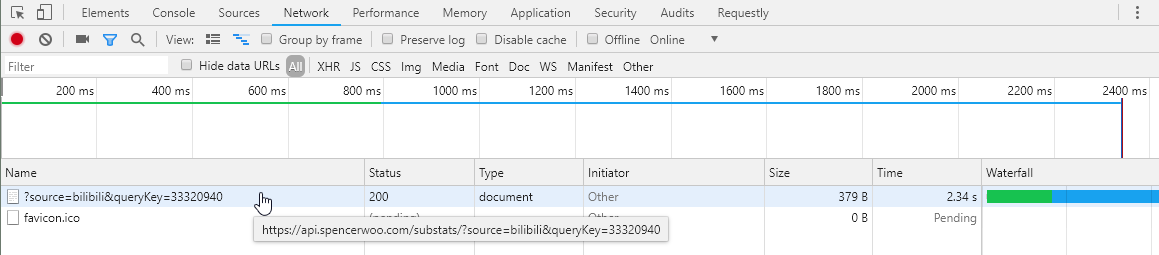
Wow, look at that speed difference. Just wow. 120ms versus 2.34s!
Usage#
Just change 33320940 in the code below to your own uid and it’ll show up!
<img src="https://img.shields.io/badge/dynamic/json?color=282c34&label=bilibili%E7%B2%89%E4%B8%9D%E6%95%B0&query=%24.data.value&url=http%3A%2F%2Fwww.zhangkexuan.cn%3A40001%2Fapi%2Ffanscount%2Fbilibili%2Fuid%2F33320940&logo=bilibili&labelColor=FE7398&logoColor=white">For example, to show the follower count of Mr. Chen (uid: 208259):
<img src="https://img.shields.io/badge/dynamic/json?color=282c34&label=bilibili%E7%B2%89%E4%B8%9D%E6%95%B0&query=%24.data.value&url=http%3A%2F%2Fwww.zhangkexuan.cn%3A40001%2Fapi%2Ffanscount%2Fbilibili%2Fuid%2F208259&logo=bilibili&labelColor=FE7398&logoColor=white">
Summary#
This time I only built a bridge, but it’s already way faster than Subsats. I’ll add API endpoints for other platforms later.
Comments