This post was translated from the original with AI assistance. Read the original
How do online games communicate? This post shows you how to implement the simplest possible network communication with the simplest TCP/IP sockets.
After getting into the Unity game engine, beginners often get the idea of making a multiplayer game. I was the same at first. I tried some multiplayer service frameworks, like PUN2, and the game did end up being playable, but that didn’t satisfy my curiosity; I still wanted to implement the server-client communication myself. I’m sure you, the reader, don’t want to just know how to use a framework without understanding how it works either.
This series of posts is based on the book Unity3D 网络游戏实战 (roughly, “Unity3D Online Game Development in Practice”). If you spot any mistakes, feel free to point them out in the comments.
Client, Server, TCP#
The apps running on your phone and the games you play on your computer are all client programs. Programs running on the operator’s servers are server programs.
In games, the client and server usually communicate over TCP (Transmission Control Protocol). TCP is a connection-oriented, reliable, byte-stream-based transport layer protocol. Simply put: you need to establish a connection, the packet loss rate is low, and the data transmitted is a byte stream.
Messaging between clients is done through the server forwarding messages.
Suppose Client A and Client B both have TCP connections to Server A.
If Client A’s position changes, how does Client B find out? Since Client A and Client B are both connected to Server A, Server A can send the message about Client A’s position change to Client B, and that’s how position info gets synchronized.
If tens of thousands of clients connect to the same server at the same time, it’s not hard to imagine that the server might crash. That’s why most online games today are split into separate server regions. Splitting into regions is really just the server side adopting a distributed architecture. That way, instead of one server handling a hundred thousand clients, N servers handle them, and the chance of a crash is much smaller.
Attentive readers might wonder: what if all hundred thousand clients pick the same region? Hahaha, anyone who’s played LOL knows this best: every time there was an event, Ionia would have a “queue”! When players flood in, the server handles it, and queuing is one way of handling it.
Socket#
A socket is an endpoint of a network connection. When two programs on a network communicate bidirectionally, each end of the communication is a socket. For Client A and Server A, Client A holds a Socket instance and Server A holds a Socket instance. A socket contains five pieces of information for network communication:
The five pieces of information in a socket:
- Protocol: TCP
- Local IP: 192.168.1.103
- Local port: 65308
- Remote IP: 192.168.1.105
- Remote port: 8888
The socket communication flow is:
Socket communication flow:
- The server creates a Socket object and Binds it to an IPEndPoint (an object made from an IP and a port number)
- The server starts to Listen
- The client Connects to the server (three-way handshake)
- The server Accepts the connection
- The client and server exchange data via Send and Receive
- One side Closes the connection (four-way handshake)
Getting Started with Network Programming: Echo#
I’ll explain this in two parts: a synchronous part and an asynchronous part.
The client is made with Unity3D, and the server is a C# .NET console application.
What Echo does: the client sends the text in the InputField to the server, the server prints a log to the console and sends the received message back to the client, and the client’s Text control displays the message text received from the server.
The Concepts of Synchronous and Asynchronous#
Synchronous means: after the sender sends data, it waits for the receiver to send back a response before sending the next packet.
Asynchronous means: after the sender sends data, it doesn’t wait for the receiver’s response and goes on to send the next packet.
Synchronous is usually avoided because it blocks threads and hurts program performance. But synchronous programs are much easier to write, so I’ll start with the simplest synchronous program.
Synchronous#
Scene setup:
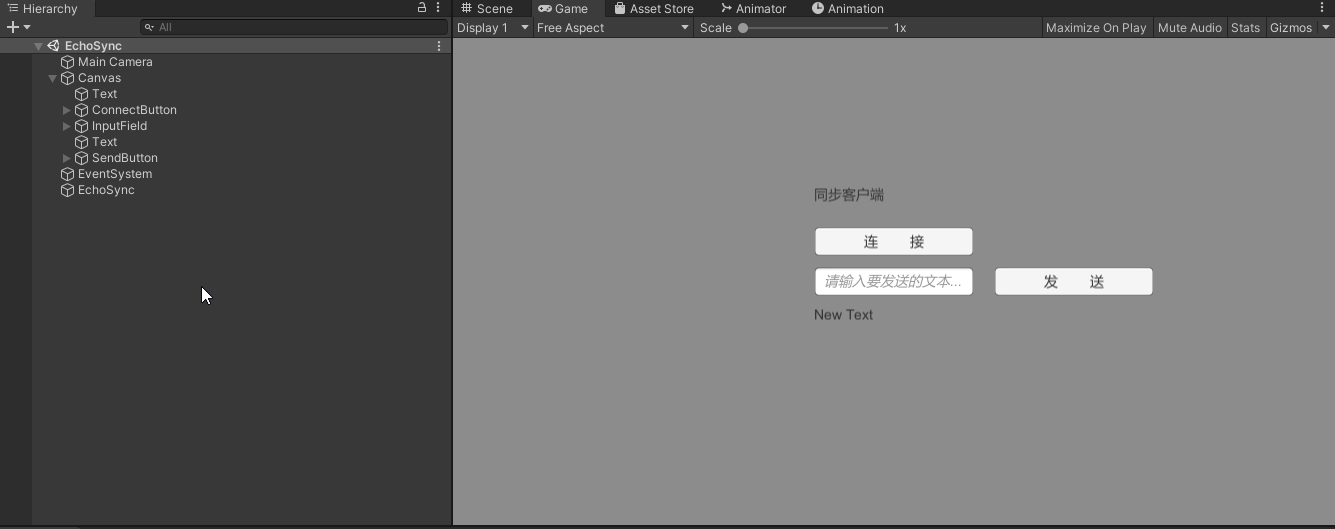
Explanation: In the Unity scene, the empty object EchoSync has the client script EchoSync.cs attached. There’s a ConnectButton bound to the client script’s Connection method, a Send button bound to the client script’s Send method, an InputField for the input box, and a Text for displaying the message sent back by the server. The InputField and Text are bound via public fields. Here the server IP is set to localhost (127.0.0.1) and the port to 8888.
Client code:
using System.Collections;
using System.Collections.Generic;
using UnityEngine;
using System.Net.Sockets;
using UnityEngine.UI;

/// <summary>
/// Synchronous, client
/// </summary>
public class EchoSync : MonoBehaviour
{
    /// <summary>
    /// Socket
    /// </summary>
    private Socket socket;

    /// <summary>
    /// Input box for the message to send
    /// </summary>
    public InputField input;

    /// <summary>
    /// Text box showing what the server sent
    /// </summary>
    public Text text;

    /// <summary>
    /// Connect to the server
    /// </summary>
    public void Connection()
    {
        //Define a Socket using IPv4, stream transport and the TCP protocol
        socket = new Socket(AddressFamily.InterNetwork, SocketType.Stream, ProtocolType.Tcp);

        //Connect to the server; the server IP is the local IP, port 8888
        socket.Connect("127.0.0.1", 8888);
    }

    /// <summary>
    /// Send a message
    /// </summary>
    public void Send()
    {
        //----------------------
        //Send

        //Get the text string from the input box
        string sendStr = input.text;

        //Convert to a byte array
        byte[] sendBytes = System.Text.Encoding.UTF8.GetBytes(sendStr);

        //Send
        socket.Send(sendBytes);

        //----------------------
        //Receive

        //Receive buffer
        byte[] readBuffer = new byte[1024];

        //Receive and get the number of bytes
        int count = socket.Receive(readBuffer);

        //Build the string
        string receiveStr = System.Text.Encoding.UTF8.GetString(readBuffer, 0, count);

        //Display the string in UGUI
        text.text = receiveStr;

        //----------------------
        //Close

        //Close the socket
        socket.Close();
    }
}
Server code:
using System;
using System.Collections.Generic;
using System.Linq;
using System.Text;
using System.Threading.Tasks;
using System.Net;
using System.Net.Sockets;

/// <summary>
/// Synchronous, server. Downsides: blocking, high CPU usage.
/// </summary>
namespace Echo_Server_Sync
{
    class Program
    {
        static void Main(string[] args)
        {
            Console.WriteLine("Hello, World!");
            //Console.ReadKey();

            //Create the Socket
            Socket listenfd = new Socket(AddressFamily.InterNetwork, SocketType.Stream, ProtocolType.Tcp);

            //Create the IPAddress
            IPAddress ipAddr = IPAddress.Parse("127.0.0.1");

            //Create the IPEndPoint
            IPEndPoint ipEp = new IPEndPoint(ipAddr, 8888);

            //Bind
            listenfd.Bind(ipEp);

            //Listen; 0 means no limit on the number of pending connections
            listenfd.Listen(0);

            Console.WriteLine("[Server] Started successfully");

            while (true)
            {
                //Accept
                Socket connfd = listenfd.Accept();
                Console.WriteLine("[Server] Accept");

                //Receive
                byte[] readBuffer = new byte[1024];
                int count = connfd.Receive(readBuffer);
                string receiveStr = System.Text.Encoding.UTF8.GetString(readBuffer, 0, count);
                Console.WriteLine("[Server received] " + receiveStr);

                //Send
                byte[] sendBytes = System.Text.Encoding.UTF8.GetBytes(receiveStr);
                connfd.Send(sendBytes);
            }

        }
    }
}
Client and server programs like these are simple to write, but they may cause stuttering in use, because Connect, Accept, Receive and Send are all blocking methods. On top of that, the current synchronous programs only support a one-to-one relationship; the server can’t handle connections from multiple clients.
Asynchronous#
In the asynchronous version, the corresponding APIs change. Connect becomes BeginConnect, Accept becomes BeginAccept, Receive becomes BeginReceive, and Send becomes BeginSend. The new methods all take a delegate of type void Callback(IAsyncResult ar) as a callback and all return an object of the IAsyncResult interface type. To finish them, there are corresponding methods EndConnect, EndAccept, EndReceive, EndSend and so on, which take an IAsyncResult object as a parameter.
Client code:
using System.Collections;
using System.Collections.Generic;
using UnityEngine;
using System.Net.Sockets;
using UnityEngine.UI;
using System;

/// <summary>
/// Asynchronous, client
/// </summary>
public class EchoAsync : MonoBehaviour
{
    /// <summary>
    /// Socket
    /// </summary>
    private Socket socket;

    /// <summary>
    /// Input box for the message to send
    /// </summary>
    public InputField input;

    /// <summary>
    /// Text box showing what the server sent
    /// </summary>
    public Text text;

    /// <summary>
    /// Receive buffer
    /// </summary>
    private byte[] readBuffer = new byte[1024];

    /// <summary>
    /// Received text
    /// </summary>
    private string recvStr = "";

    /// <summary>
    /// Connect to the server
    /// </summary>
    public void Connection()
    {
        //Define a Socket using IPv4, stream transport and the TCP protocol
        socket = new Socket(AddressFamily.InterNetwork, SocketType.Stream, ProtocolType.Tcp);

        //Start connecting to the server asynchronously; server IP is the local IP, port 8888, callback is ConnectCallback, callback state is socket
        socket.BeginConnect("127.0.0.1", 8888, ConnectCallback, socket);
    }

    /// <summary>
    /// Callback for the asynchronous connect
    /// </summary>
    /// <param name="ar"></param>
    public void ConnectCallback(IAsyncResult ar)
    {
        try
        {
            //Get the socket object from ar's async state
            Socket socket = (Socket)ar.AsyncState;

            //End the asynchronous connect
            socket.EndConnect(ar);

            Debug.Log("Socket connected successfully");

            //Start receiving asynchronously
            socket.BeginReceive(readBuffer, 0, 1024, 0, ReceiveCallback, socket);
        }
        catch(SocketException ex)
        {
            Debug.LogError("Socket connection failed: " + ex.ToString());
        }
    }

    /// <summary>
    /// Callback for the asynchronous receive
    /// </summary>
    /// <param name="ar"></param>
    public void ReceiveCallback(IAsyncResult ar)
    {
        try
        {
            Socket socket = (Socket)ar.AsyncState;

            //End the asynchronous receive; returns the number of bytes received
            int count = socket.EndReceive(ar);

            recvStr = System.Text.Encoding.UTF8.GetString(readBuffer, 0, count);

            //Start receiving asynchronously again, forming a loop
            socket.BeginReceive(readBuffer, 0, 1024, 0, ReceiveCallback, socket);
        }
        catch(SocketException ex)
        {
            Debug.LogError("Socket receive failed: " + ex.ToString());
        }
    }

    /// <summary>
    /// Send a message asynchronously
    /// </summary>
    public void Send()
    {
        //----------------------
        //Send

        //Get the text string from the input box
        string sendStr = input.text;

        //Convert to a byte array
        byte[] sendBytes = System.Text.Encoding.UTF8.GetBytes(sendStr);

        //Send
        socket.BeginSend(sendBytes, 0, sendBytes.Length, 0, SendCallback, socket);
    }

    /// <summary>
    /// Callback for sending a message asynchronously
    /// </summary>
    /// <param name="ar"></param>
    public void SendCallback(IAsyncResult ar)
    {
        try
        {
            Socket socket = (Socket)ar.AsyncState;
            int count = socket.EndSend(ar);
            Debug.Log("Socket sent successfully, bytes sent: " + count);
        }
        catch(SocketException ex)
        {
            Debug.LogError("Socket send failed" + ex.ToString());
        }
    }

    private void Update()
    {
        text.text = recvStr;
    }
}
Things to note:
- Once you go asynchronous, you can’t update Unity controls (such as Text) directly in the callbacks, because the async code runs on a new thread, and non-main threads can’t do anything with Unity controls. So all you can do is change the value of a string and keep assigning that string in the Update method.
- Calling the BeginXXX method again inside the callback, passing in the same callback, forms a loop.
- Async code may throw SocketException, so you need a try/catch to catch exceptions.
Server code:
using System;
using System.Collections.Generic;
using System.Linq;
using System.Text;
using System.Threading.Tasks;
using System.Net;
using System.Net.Sockets;

/// <summary>
/// Asynchronous, server
/// </summary>
namespace Echo_Server_Async
{
    /// <summary>
    /// Client state
    /// </summary>
    class ClientState
    {
        //Socket
        public Socket socket;

        //Receive buffer
        public byte[] readBuffer = new byte[1024];
    }

    class Program
    {
        //Listening Socket
        static Socket listenfd;

        //Client Sockets and their states
        static Dictionary<Socket, ClientState> clients = new Dictionary<Socket, ClientState>();

        static void Main(string[] args)
        {
            Console.WriteLine("Hello, World!");
            //Console.ReadKey();

            //Create the Socket
            listenfd = new Socket(AddressFamily.InterNetwork, SocketType.Stream, ProtocolType.Tcp);

            //Create the IPAddress
            IPAddress ipAddr = IPAddress.Parse("127.0.0.1");

            //Create the IPEndPoint
            IPEndPoint ipEp = new IPEndPoint(ipAddr, 8888);

            //Bind
            listenfd.Bind(ipEp);

            //Listen; 0 means no limit on the number of pending connections
            listenfd.Listen(0);

            Console.WriteLine("[Server] Started successfully");

            //Start accepting asynchronously
            listenfd.BeginAccept(AcceptCallback, listenfd);

            Console.ReadLine();
        }

        /// <summary>
        /// Callback for the asynchronous Accept
        /// </summary>
        /// <param name="ar"></param>
        public static void AcceptCallback(IAsyncResult ar)
        {
            try
            {
                Console.WriteLine("[Server] Accept");
                Socket listenfd = (Socket)ar.AsyncState;
                Socket clientfd = listenfd.EndAccept(ar);

                //clients list
                ClientState state = new ClientState();
                state.socket = clientfd;
                clients.Add(clientfd, state);

                //Start receiving data asynchronously
                clientfd.BeginReceive(state.readBuffer, 0, 1024, 0, ReceiveCallback, state);

                //Keep accepting asynchronously
                listenfd.BeginAccept(AcceptCallback, listenfd);
            }
            catch(SocketException ex)
            {
                Console.WriteLine("Socket Accept failed" + ex.ToString());
            }
        }

        /// <summary>
        /// Callback for the asynchronous receive
        /// </summary>
        /// <param name="ar"></param>
        public static void ReceiveCallback(IAsyncResult ar)
        {
            try
            {
                ClientState state = (ClientState)ar.AsyncState;
                Socket clientfd = state.socket;
                int count = clientfd.EndReceive(ar);

                //Client closed
                if(count == 0)
                {
                    clientfd.Close();
                    clients.Remove(clientfd);
                    Console.WriteLine("Socket closed");
                    return;
                }

                string recvStr = System.Text.Encoding.UTF8.GetString(state.readBuffer, 0, count);
                Console.WriteLine("[Server received] " + recvStr);

                byte[] sendBytes = System.Text.Encoding.UTF8.GetBytes("Echo " + recvStr);
                clientfd.Send(sendBytes);
                Console.WriteLine("[Server sent] " + "Echo " + recvStr);

                //Start receiving asynchronously again
                clientfd.BeginReceive(state.readBuffer, 0, 1024, 0, ReceiveCallback, state);
            }
            catch(SocketException ex)
            {
                Console.WriteLine("Socket receive failed" + ex.ToString());
            }
        }
    }
}
Things to note:
- The server uses a Dictionary<Socket, ClientState> to store the collection of clients.
- ClientState stores the Socket object for the corresponding connection and its buffer.
- EndReceive returns the number of bytes sent by the client; 0 bytes means that client has disconnected.
- To keep the code short, the server’s Send isn’t asynchronous, but you can implement it asynchronously for even better results.
A program like this is efficient, uses relatively little CPU, doesn’t block, and a single server can handle connections from multiple clients.
For details on the APIs used in the program, see the official Microsoft C# API docs.
Results#
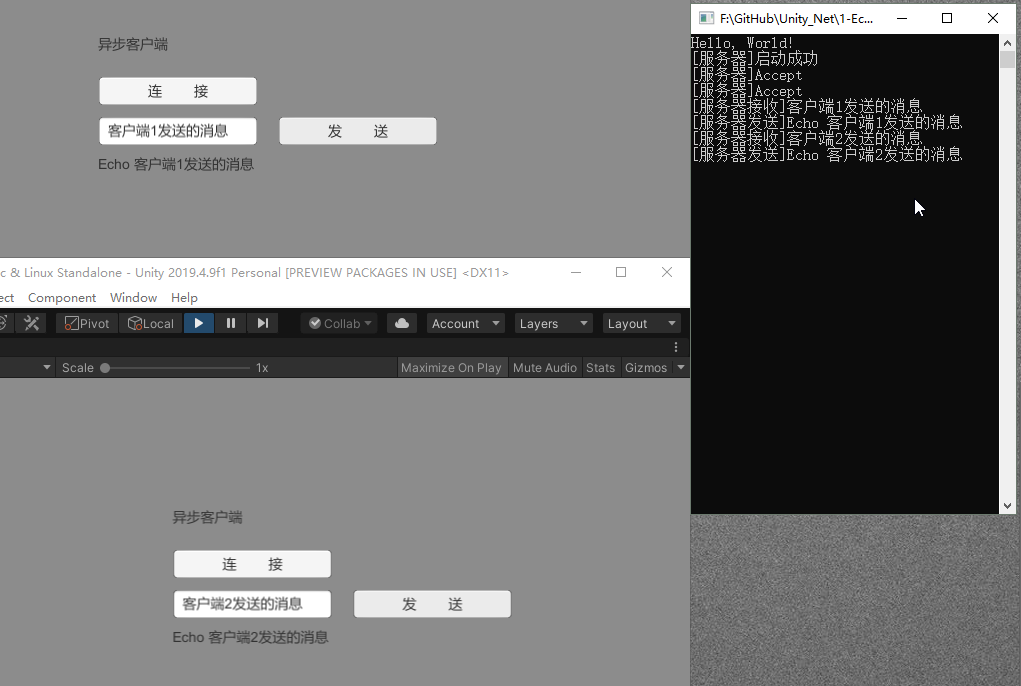
Using the asynchronous version as an example:
Summary#
Synchronous methods are easy to write but blocking, which can hurt program efficiency.
Asynchronous methods are efficient and perform well, but they’re relatively more complex to write.
For games, performance is crucial, so we generally don’t use synchronous methods.
Comments