This post was translated from the original with AI assistance. Read the original
Originally published on my old cnblogs blog: 《Win32多线程程序设计》读书笔记(二) (written 2020-03-29).
Chapter 2#
From this chapter on, we formally get into Win32 multithreaded programming.
Creating a Thread#
Let’s look at the following code.
#include <stdio.h>
#include <Windows.h>

DWORD WINAPI ThreadFunc(LPVOID);

int main()
{
    HANDLE hThread;
    DWORD threadId;

    hThread = CreateThread(NULL,
        0,
        ThreadFunc,
        0,
        0,
        &threadId
    );

    printf("Thread is running...\n");
    for (int i = 0; i < 20; i++)
        printf("Main:%d\n", i + 1);
    return 0;
}

DWORD WINAPI ThreadFunc(LPVOID p)
{
    for (int i = 0; i < 20; i++)
        printf("Thread:%d\n", i+1);

    return 0;
}
Here, DWORD means a Double Word, and one Word represents two Bytes, so DWORD means 4 bytes, a total of 32 bits. In other words, it’s unsigned long. You’ll find the original definition is typedef unsigned long DWORD;. Here DWORD is the function’s return type.
WINAPI is actually _stdcall, which specifies the function’s calling convention.
LPVOID is actually the void far* type, a kind of pointer type. The far and near types are only needed on 16-bit machines; far was originally used to make a pointer point to an address in another segment. On a 32-bit machine there’s no distinction between far and near.
HANDLE means a handle, i.e. an identifier for some resource; here it’s used to identify a thread, since we want to create a thread.
The function prototype of CreateThread is:
HANDLE CreateThread(
	LPSECURITY_ATTRIBUTES lpThreadAttributes,
    DWORD dwStatckSize,
    LPTHREAD_START_ROUTINE lpStartAddress,
    LPVOID lpParameter,
    DWORD dwCreationFlags,
    LPDWORD lpThreadId
);
Here, lpThreadAttributes describes the thread’s security attributes; NULL means the default.
dwStatckSize describes the size of the thread’s stack; 0 means the default: 1MB.
lpStartAddress describes the starting address, i.e. a function pointer.
lpParameter is passed in as the argument to the function specified by the function pointer above.
dwCreationFlags can start the thread suspended; by default it runs immediately.
lpThreadId is where the generated thread’s id is returned.
So the code at the very top is simply a program that starts a thread with default settings and runs the ThreadFunc function.
The run result:
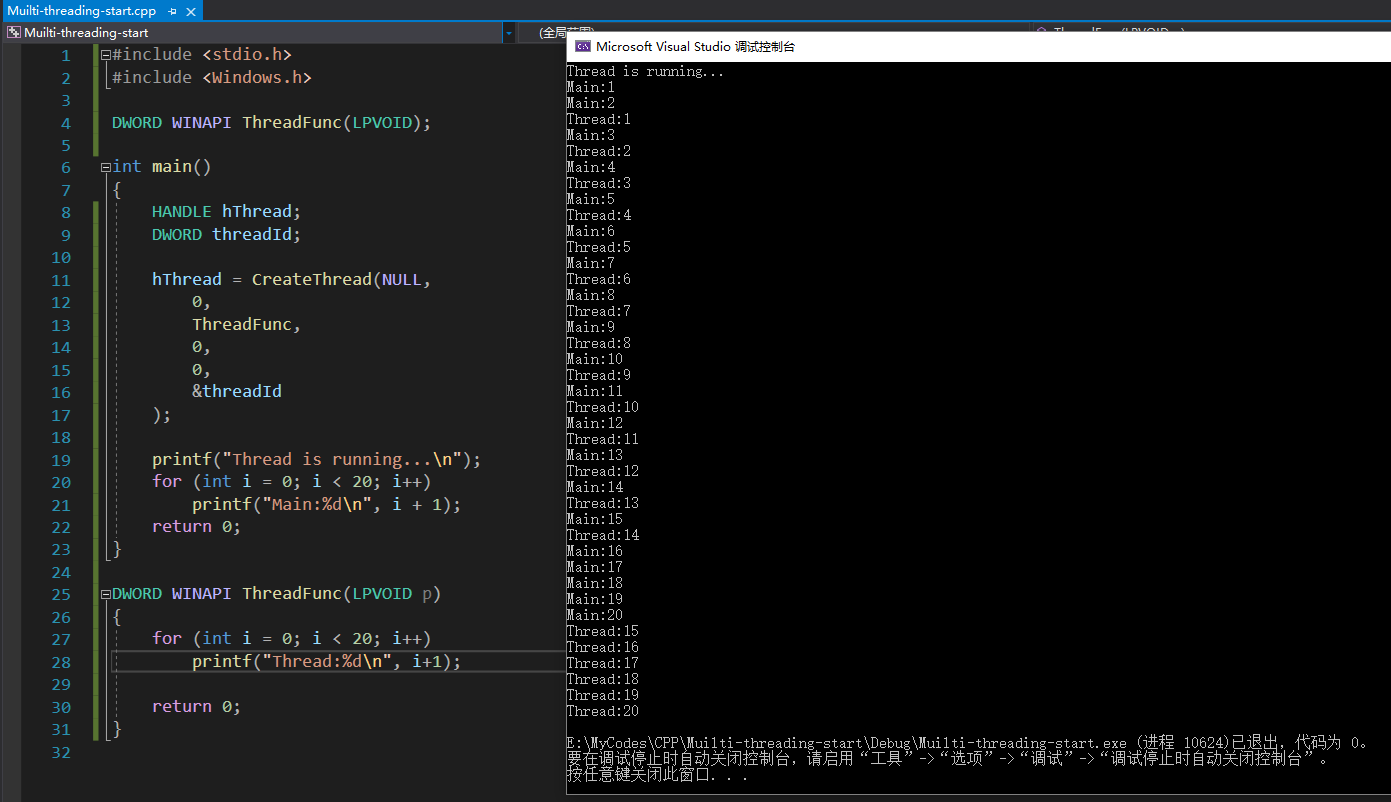
As you can see, the execution order between the main thread and the newly started thread is unknown; this is a result of the operating system’s scheduling policy.
Creating Multiple Threads#
We now know that the CreateThread function can create a thread and return a handle, so we can use a for loop to spawn multiple threads and analyze them:
#include <stdio.h>
#include <Windows.h>

DWORD WINAPI MyThreadFunction(LPVOID);

int main()
{
    HANDLE hThread;
    DWORD threadId;

    for (int i = 0; i < 5; i++)
    {
        hThread = CreateThread(NULL,
            0,
            MyThreadFunction,
            (LPVOID)(i+1),
            0,
            &threadId
        );

        if (hThread)
        {
            printf("Thread%d launched...\n", i+1);
        }
    }

    Sleep(3000);
    return 0;
}

DWORD WINAPI MyThreadFunction(LPVOID p)
{
    for (int i = 0; i < 10; i++)
        printf("%d\n", (int)p);
    return 0;
}
As mentioned earlier, the CreateThread function can pass an argument to the function being called. Here we use a cast: (LPVOID)(i+1). Without the cast, it will raise an error.
Sleep(3000); makes the main function pause for 3 seconds before ending, in order to wait for all threads to start and finish executing; otherwise some threads might not have started or finished before the main function returns.
The result:
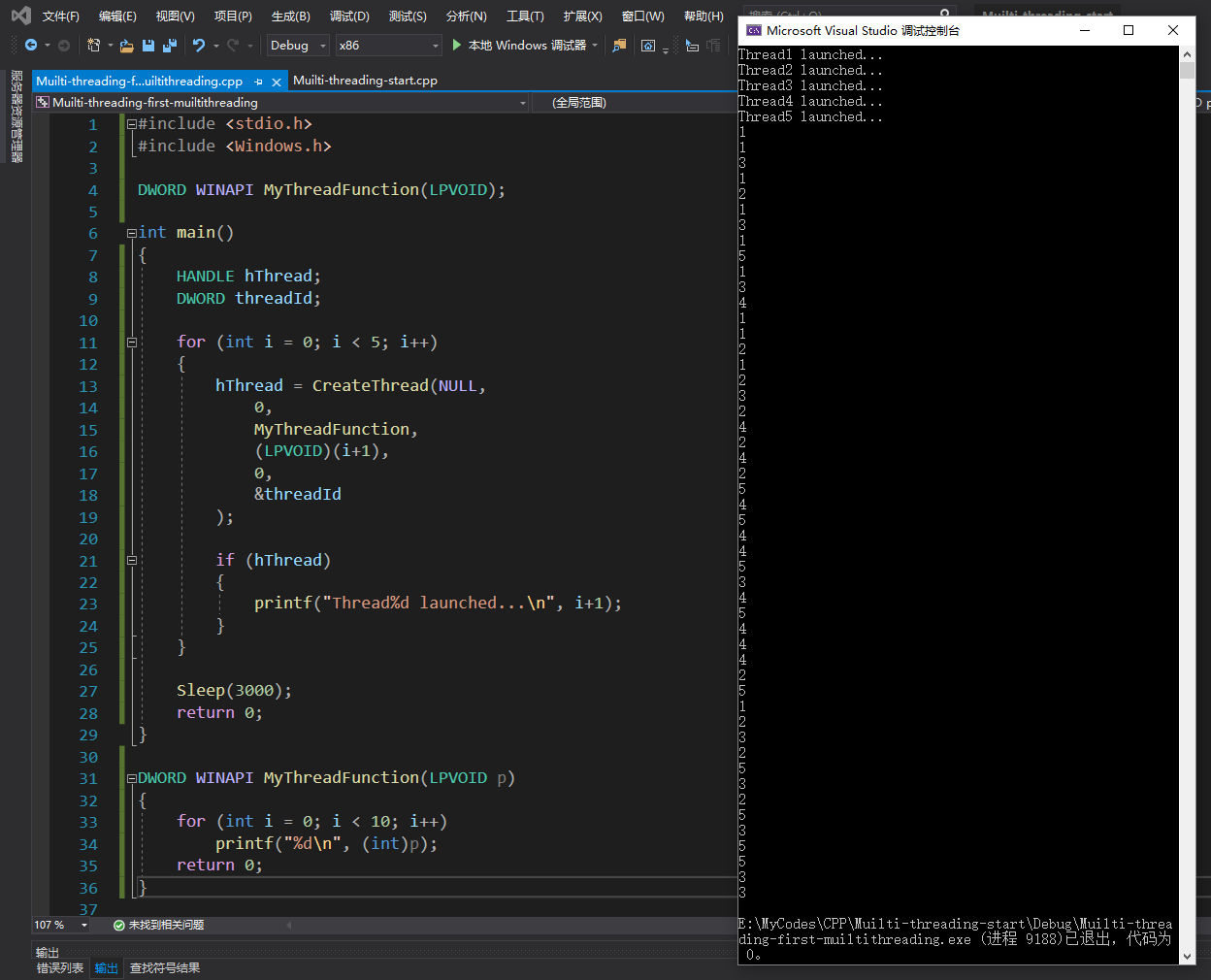
1 through 5 are each printed 10 times, out of order. Although they’re Thread1-5, a second run might well be Thread1 2 4 3 5 instead.
If we write printf("%d%d%d%d%d%d%d%d\n",(int)p,(int)p,(int)p,(int)p,(int)p,(int)p,(int)p,(int)p);, we might even see cases like 333344444444 or 3333; this is a race condition.
The reason for the disorder is exactly what was mentioned earlier: it’s unpredictable.
Our task is to learn how to get predictable results out of multithreaded programs, which is exactly what the book Multithreading Applications in Win32 is here to teach us.
The problem above reflects several characteristics of multithreaded programs:
- Unpredictable
- Execution order is not guaranteed
- Task switches can happen anytime, anywhere
- Threads are highly sensitive to small changes
- Threads don’t always start immediately
Kernel Objects#
The variable returned by the CreateThread function is a handle, and it also outputs a thread id through a parameter.
The thread id can uniquely identify a given thread in any process in the system.
A handle is called a kernel object, managed by KERNEL32.DLL. It’s actually a pointer that points to something in the operating system’s memory space, but you don’t have permission to access that thing directly, for the sake of maintaining the operating system’s integrity and security.
A List of Win32 Kernel Objects:#
- processes
- threads
- files
- events
- semaphores
- mutexes
- pipes (of two kinds: named and anonymous)
Differences Between GDI Objects and Kernel Objects#
A GDI object has a single owner, either a process or a thread.
A kernel object can have more than one owner and can span processes. A kernel object keeps a reference count to record how many handles correspond to it, and it also records which process or thread is the owner. Calling a function like CreateThread that returns a handle increments the count by 1, and calling the CloseHandle function decrements it by 1; once the count reaches 0, the kernel object is destroyed.
The Importance of CloseHandle#
After finishing your work, you should call the CloseHandle function to release the kernel object.
The function prototype of CloseHandle is:
BOOL CloseHandle(
	HANDLE hObject
);
hObject represents a handle to an already-opened object.
On success it returns TRUE, otherwise FALSE; if it fails, you can call GetLastError to get the reason for the failure.
If we don’t get into the habit of calling CloseHandle afterward, then even though the operating system will automatically decrement the count by 1, our own logic will go wrong.
If a process frequently spawns worker threads and we never close the thread handles, we dump them all onto the operating system to “clean up after us.” When the operating system cleans up for us this way, resource leaks occur. That’s not the outcome we want.
tips:
Worker thread: a thread that has nothing to do with the graphical user interface (GUI) and only does computation.
Optimizing the Earlier Code#
Now that we understand the importance of CloseHandle, we need to optimize the earlier code by adding CloseHandle.
#include <stdio.h>
#include <Windows.h>

DWORD WINAPI MyThreadFunction(LPVOID);

int main()
{
    HANDLE hThread;
    DWORD threadId;

    for (int i = 0; i < 5; i++)
    {
        hThread = CreateThread(NULL,
            0,
            MyThreadFunction,
            (LPVOID)(i+1),
            0,
            &threadId
        );

        if (hThread)
        {
            printf("Thread%d launched...\n", i+1);
            //call CloseHandle here.
            CloseHandle(hThread);
        }
    }

    Sleep(3000);
    return 0;
}

DWORD WINAPI MyThreadFunction(LPVOID p)
{
    for (int i = 0; i < 10; i++)
        printf("%d\n", (int)p);
    return 0;
}
Code like this is more rigorous.
The Difference Between a Thread Kernel Object and a Thread#
A thread’s handle points to the “thread kernel object,” not to the thread itself. So you can close its handle before the thread ends, just as in the code above, where we actually closed the handle before the thread finished.
A thread object’s default reference count is 2. Calling CloseHandle decrements the count by 1, and the thread ending decrements it by 1. Only when both of these things happen is the thread object truly cleaned up.
Thread Exit Code#
The earlier code used the Sleep function to wait for threads to finish, but in reality, if the CPU is busy, the threads may still be running when the wait is over.
So we have a new function, GetExitCodeThread, that we can use:
BOOL GetExitCodeThread(
	HANDLE hThread,
    LPDWORD lpExitCode
);
Here, hThread is the handle of the thread you pass in.
lpExitCode is a pointer to a DWORD that receives the exit code.
On success it returns TRUE; on failure it returns FALSE and you can use GetLastError to get the error information. If the thread has ended, lpExitCode brings back the exit code; otherwise it brings back STILL_ACTIVE.
One thing to be especially careful of: you can’t use GetExitCodeThread’s return value to determine whether a thread has ended, because it returns TRUE even when a thread doesn’t yet have a so-called exit code. So you can’t tell from its return value whether the thread is running or has already ended; the return value is STILL_ACTIVE.
Forcibly Terminating a Thread#
If you want to be a bit more brutal, you can use the ExitThread function. Its prototype is:
VOID ExitThread(
	DWORD dwExitCode
);
dwExitCode specifies the exit code of the thread that calls this function.
In other words, calling this function within a function invoked by a thread, say ExitThread(6), immediately ends that thread with an exit code of 6.
Note that the ExitThread function never returns anything, meaning any operations after the call (within the same scope) will have no effect.
If you use the ExitThread function in the main thread, it causes the main thread to end while the “worker threads” keep running. This skips the cleanup functions in the runtime library, leaving opened files uncleaned, which is bad.
If you end the main thread, it causes all other threads to be forcibly terminated.
The primary thread is responsible for the GUI message loop. Its termination causes the program to end and other threads to be forcibly shut down, with no chance for those other threads to be cleaned up.
MTVERIFY Error Handling#
MTVERIFY is a macro that works for both GUI programs and Console programs. It essentially records and interprets Win32 GetLastError() to obtain a description. If a Win32 function fails, MTVERIFY prints out a brief explanation.
To use it, write MTVERIFY(...), where ... is a Win32 function. For example, MTVERIFY(CloseHandle(hThrd));
Microsoft’s Multithreading Model#
Threads come in two kinds: GUI threads and worker threads.
GUI threads are responsible for building windows and handling the message loop.
Worker threads are responsible for doing pure computational work.
Keys to Successful Multithreaded Design#
- Keep each thread’s data separate and avoid using global variables
- Don’t share GDI objects between threads
- Make sure you know your threads’ states; don’t just end the program without waiting for them to finish
- Let the main thread handle the user interface (UI)
Comments