This post was translated from the original with AI assistance. Read the original
Reposted from my old CSDN blog: C++ STL 之 不定长数组 vector (written 2018-02-20); formatting tidied during migration.
STL: Standard Template Library, the C++ standard template library, which wraps up all kinds of interfaces for us to call. vector is a class template and one kind of container. It’s a variable-length array: you can add and remove elements at the end, get the array’s size, and so on. Other containers include set, map, list, stack, queue, etc… We’re bound to use them in algorithm contests.
The example code for this post used to be in the GitHub repository zzxzzk115/STL_vector (the repository no longer exists; see the Wayback Machine copy)
Let’s first look at how to use vector:
First include the header
#include <vector>And of course don’t forget
#include <iostream>
using namespace std;
Next is creating vector objects. The vector class template has many constructors, so there are several ways to create an object (created in main):
vector<int> v1;         // create an empty vector
vector<int> v2(v1);     // copy v1 into a new vector
vector<int> v3(5);      // create a vector with 5 elements
vector<int> v4(5,0);    // create a vector with five 0s
To make it easy to see which elements are in our vector objects, we can traverse a vector object with an iterator and print them. For that, let’s first look at how begin() and end() are used: (you can think of an iterator as a pointer; begin() points to the head of the vector object, and end() points to its tail)
void PrintVector(vector<int> ve)
{
    cout << "Vector中的数据为:";
    vector<int>::iterator veIterator;
    for (veIterator = ve.begin(); veIterator < ve.end(); veIterator++)
    {
        cout << *veIterator << " ";
    }
    cout << endl;
}
Now we can have some fun. pop_back() and push_back() do what the names say: add to the end, remove from the end. So easy.
Let’s test it in the main function:
v1.push_back(5);
v1.push_back(4);
v1.push_back(8);
PrintVector(v1);
The result is

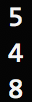
How do we access the element at a certain position? Use [index] or at(index) (index is the index value, starting from 0)
cout << v1[0] << endl;
cout << v1.at(1) << endl;
cout << v1[2] << endl;
The result is
We can also access the data at the front and back: back() front()
cout << v1.back() << endl;
cout << v1.front() << endl;
The result is

max_size() gets the maximum capacity, and size() gets the current number of elements in the vector object
cout << "v1中的最大容量为:" << v1.max_size() << endl;
cout << "v1中的元素个数为:" << v1.size() << endl;
The result is

empty() returns 1 if it’s empty and 0 if it isn’t
cout << "v1是否为空?" << v1.empty() << endl;The result is

sort() sorts the vector in ascending order, and reverse() sorts it in descending order
sort(v1.begin(), v1.end());
PrintVector(v1);
reverse(v1.begin(), v1.end());
PrintVector(v1);
The result is

swap() swaps the data of vectors
swap(v1, v4);
PrintVector(v1);
PrintVector(v4);
The result is

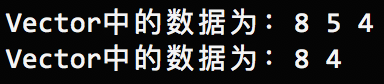
erase() removes an element and insert() inserts one, but you must use an iterator
Let’s look at erase first; insert works the same way, just swap erase for insert
PrintVector(v4);
vector<int>::iterator vErase = v4.begin();
vErase = vErase + 1;
v4.erase(vErase);
PrintVector(v4);
The result is
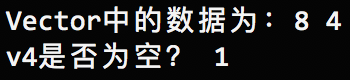
clear() empties the vector’s elements
PrintVector(v4);
v4.clear();
cout << "v4是否为空? " << v4.empty() << endl;
The result is
Here’s the documentation:
Comments